Configuration — foldyard.toml and the environment
All project config lives in foldyard.toml at the repo root. foldyard init writes a starter;
foldyard finds the repo by walking up from your working directory to that file. Terms such as
mode, switch and level are defined in the glossary.
How values resolve
Every value resolves the same way, everywhere:
- an environment variable (always wins),
foldyard.local.toml— your gitignored, personal overrides besidefoldyard.toml,foldyard.toml— the committed file the team shares,- the built-in default.
The local file is deep-merged over the shared one, key by key: a local [claude] keyless
lands beside the committed [claude] system_prompt instead of replacing the table. Arrays,
including arrays of tables such as [[overlay]], are replaced whole. Put anything personal
there (your keyless choice, a private [[inject]]) so it never puts a credential prompt in
front of a colleague. A missing or malformed file contributes nothing.
foldyard init writes a commented foldyard.local.toml.example and gitignores
foldyard.local.toml itself (at any depth, so worktree copies are ignored too).
Presence-gated tables. Declaring the table, even empty, is the opt-in: [proxy],
[claude], [codex], [vscode] and every [plugins.<name>]. Delete the table to turn the
feature off.
Edits don't reach your computer until you adopt them. The box and the stack read the files live; what runs on your computer (the proxy, the token services, credential injection) reads an adopted copy. See The adopted config.
disabled = true — the one key that subtracts
A merge can only add, and blanking a presence-gated table's keys doesn't switch it off. So any
table can carry disabled = true, and it is dropped from the resolved config as if never
written:
# foldyard.local.toml — the repo commits [codex]; you don't have that subscription.
[codex]
disabled = true
For you, that means no Codex CLI installed at box-up, no credential prompt, and no codex row in
fy mode or fy state. It works at any depth ([plugins.gcp-metadata]), on single entries of an
array of tables (park one [[inject]] rule), and in either file: a project can ship a block
disabled and a developer can opt in with disabled = false. Only a real TOML boolean counts.
The marker is removed after the merge and never reaches the rest of foldyard.
fy config widenings lists the blocks you've removed and which file removed them.
Renamed keys
| Old name | Current name |
|---|---|
[machine] wall |
[machine] firewall |
[machine] host_wall |
[machine] host_firewall |
[proxy] default_deny |
[proxy] enforce |
axis in [[inject]] / [[require]] |
switch |
MACHINE_WALL / MACHINE_HOST_WALL |
MACHINE_FIREWALL / MACHINE_HOST_FIREWALL |
The old names still work as aliases (if a file has both, the new one wins); fy doctor and
fy config widenings flag them. When you rename them, raise min_foldyard_version in the same
commit: an older fy reads the new names as absent and would, for example, silently leave the
VM firewall off.
Some keys are no longer honoured at all — [proxy] allow, [[inject]] minter, [[inject]]
token_env, [vscode] workspace_file. fy config widenings names each one with its
replacement, and fy doctor warns about them.
Experimental settings
A setting tagged (experimental) below is off unless you turn it on, and makes one or both of two claims:
- May change. Its config, output format or payload isn't settled, and can change in a minor release.
- Unproven in use. Its config is settled, but nobody has used it day to day yet, so expect rough edges.
On your computer, fy doctor's experimental row lists the ones your adopted config turns on,
and what is still unproven about each. (Not in the box, which can't see what's adopted.) A
setting stops being experimental in a release whose changelog says so.
[project]
Who the project is and what stack it drives.
[project]
name = "acme"
prefix = "acme"
app = "app"
app_port = "WEB_PORT"
compose = ["compose.yml"]
min_foldyard_version = "0.2.0"
name— the project key; names the state dir~/.foldyard/<name>/. Default: the repo directory name, lowercased. Env:FOLDYARD_PROJECT. A plain name — letters, digits,.,_and-, starting with a letter or digit; anything else is refused.prefix— container/volume/network name prefix (a worktree appends-<name>). Default:name. Env:FOLDYARD_PROJECT_PREFIX.app— the compose servicefy shelltargets. Default:"app". Env:FOLDYARD_APP.app_port— which[ports]key is the browsable app;fy openopens it and the TUI shows it. Port keys are yours, so foldyard never guesses. Default: none (no app URL). Env:FOLDYARD_APP_PORT_KEY.compose— your compose files in-forder (a single string works too), relative to the active checkout or absolute. Default: none — the project is box-only. Every stack verb (fy up,fy ps,fy logs,fy shell,fy build,fy down,fy nuke) then says so and points at itsfy box …counterpart where one exists;fy upstill starts the VM and the supervisor. A declared file missing from the checkout is an error naming the file.compose_env— names of variables from your own environment the compose client may read, e.g.["NPM_TOKEN"]for a build arg. Default:[]. The client runs on your computer, and otherwise sees only foldyard's resolved vars (PODMAN_PROJECT, the[ports]values, …) plus what it needs to run (PATH,HOME, locale,COMPOSE_*/PODMAN_*settings) — neverhost.env. Each name is a widening, listed byfy config widenings: the compose files are editable from the box, and a${NAME}in one hands the value to a container.ensure_dirs— bind-mount source dirs (checkout-relative) your compose file expects; created empty onup. Default:[].external_network—truelets foldyard own the{prefix}_defaultnetwork: created onup/box up, removed onnuke. Your compose file must then declarenetworks.defaultwithexternal: trueand an explicitname. Use it when the box's permanent attachment makes a compose-owned network noisy (downwarnings,box upbefore the firstupfailing). Default:false.worktree_init— a scriptfy worktree addruns for each new worktree, to copy gitignored local config (env files, editor settings) across. It runs in a throwaway container in the VM from the box image, never on your computer, assh <script> --source <main-repo>with the new worktree as the working directory. The path is relative to the repo root and must stay inside the repo. If the box image isn't built yet it is skipped with the command to run later (fy worktree init <name>). Default: none. Env:FOLDYARD_WORKTREE_INIT.dev_vm_dir— transitional: where generated assets and the.dev-mode.jsonmirror land, relative to the repo root. Default:".". Env:FOLDYARD_DEV_VM_DIR.min_foldyard_version— a floor, not a pin:fyrefuses to run in this checkout below it. Must be a string. Default: none, butfy initstamps the version that scaffolded the file — unless that version can't be compared (0+unknownfrom a bare source tree, or a local build), in which case it writes a commented placeholder instead.recommended_foldyard_version— a nudge, never a block, printed only onfy up,fy box upandfy host restart. Default: none.FOLDYARD_NO_VERSION_NUDGE=1silences it.[project.foldyard_version_reasons]— a ledger of why this repo adopted each version, keyed by version. Both messages list the entries between your version and the one you're pointed at. Default: empty.
[project.foldyard_version_reasons]
"0.2.0" = "the verify false-pass fix; CI runs this"
"0.3.0" = "the Lima backend, for the M-series boxes"
▸ foldyard 0.1.0 is behind the 0.3.0 this repo expects. Since yours:
    0.2.0  the verify false-pass fix; CI runs this
    0.3.0  the Lima backend, for the M-series boxes
  Run `uv tool upgrade foldyard`.
Append entries; never rewrite them — an entry describes a version that's already frozen, so it can't go stale. Delete entries below the floor: they can no longer be shown. A malformed key or a non-string reason drops that one line.
Using the two version bounds
- Adopt a version: pin CI to it, run the suite, merge.
fy changeloglists what changed since the version this file declares (the higher of the two bounds) up to the installed one — what the config may need to catch up on. - Set
recommended_foldyard_versionto it. Colleagues see one line at their next session start and upgrade when it suits them. - When something actually needs that version, raise
min_foldyard_versionto match. By then almost everyone has upgraded, so the floor blocks nobody mid-task.
Time-box a recommendation: one left unchanged for months is noise — promote it to a floor or delete it. Leave it unset if unsure.
Why it works this way:
- The floor refuses instead of warning because foldyard ignores unknown keys, so an old
fyreading a new config silently does the old thing. - The nudge speaks only on session-start verbs so it stays worth reading.
fy doctoralways shows the version window, even withFOLDYARD_NO_VERSION_NUDGEset. - foldyard never asks PyPI for the latest release.
fyalso runs in the box, where egress goes through the allowlist; the repo's own tested version is the useful answer anyway. - A floor only protects from the release that implements it onward — an older
fyignores the key.
[machine]
The rootless VM that mounts only this repo. Sizing, vmtype and mounts apply at first
creation; change them with fy machine recreate. The one exception is foldyard's two
directories on Lima, below, which a restart adds.
What the VM mounts
The checkout and the worktrees root, both writable — and, on the lima backend, two directories of foldyard's own beside them, one per direction (ADR-0033):
to-box(~/.foldyard/<project>/to-box/) — your computer writes it; the VM and every box can only read it (the box sees it at/run/foldyard/to-box). Read-only is enforced outside the guest, so even root in the VM can't change what is there. That holds only forvzwith virtiofs andqemuwith 9p, so foldyard pins Lima'smountTypeto match thevmtypeand mounts no to-box on any other pair (krunkit, say). Every box of the project can read it, so it never holds a secret. Its first use is the monitor's file sink (fy monitor hook add NAME --to-box).from-box(~/.foldyard/<project>/from-box/) — the box writes it: one slot per checkout (main/,worktrees/<name>/), where the agents' transcripts are bound out (seetranscript_sync_seconds). Your computer reads it as untrusted input, never through a link.
A VM that predates them is refused while it runs (fy machine stop && fy up once adds them;
containers and volumes are kept), and FOLDYARD_STATE_DIR must point outside the checkout and
the worktrees root. The podman backend's mounts are fixed when the machine is created and no
podman provider enforces read-only outside the guest, so it gets neither: its boxes keep binding
transcripts into the checkout. fy doctor shows a to-box row; fy verify checks both.
[machine]
backend = "lima"
vmtype = "vz"
firewall = true
host_firewall = true
name = "acme"
cpus = 4
memory_mib = 8192
disk_gib = 60
backend—"lima"|"podman". Default:"lima"(also whatinitwrites): one VM per project, running concurrently, and the only backend with the VM firewall."podman"is one shared podman machine for everything — nothing extra to install, but no per-project VMs and no VM firewall. There is no VM-less option; a config still naming the retirednativebackend gets a warning and the podman backend (ADR-0027). Lima needslimactlandpodman(which drives the VM's socket). A missing CLI is a hard error, whether you named the backend or inherited the default. Env:MACHINE_BACKEND.firewall— the VM firewall: nftables rules in the VM, installed as root at boot, so the box's only way out is the proxy on your computer. Traffic that ignores the proxy settings is rejected, not let through. Lima only (preflight enforces it), and needs[proxy]declared, or the box has no way out at all. Default:false(initwritestrue). Env:MACHINE_FIREWALL(1/true/on/yes).host_firewall— the host firewall: the same rules again on your computer, matching the VM process's own traffic, so a guest-kernel exploit that removes the VM firewall still can't get out. It allows only DNS, this project's port range, and the VM's own loopback plumbing (the SSH forward, Lima's DNS resolver). Default:false. Env:MACHINE_HOST_FIREWALL.- Needs
firewall = trueand a Linux host withnft, cgroup v2 and a kernel built withCONFIG_NFT_SOCKET(the rule matchessocket cgroupv2). macOS can't provide it and the stock WSL2 kernel lacks that option; preflight refuses rather than silently downgrading (on WSL2 the VM firewall still applies). - You install it once — foldyard never loads it
(ADR-0028).
fy machine
    host-firewall
writes the user slice the VM runs in (~/.local/share/systemd/user/fy-machine-<vm>.slice) and prints the table, a system unit that loads it, and the root commands to install them;--uninstallprints the removal steps. Launch verbs refuse until it's installed. - Every
fy upchecks it's enforcing, from inside the VM's slice, and refuses with the reason if not (not installed; installed before a reboot changed the slice's id; the port range changed).fy doctorshows the same row. A VM already running outside its own slice is refused withfy machine stop && fy up.fy machine stopandfy machine rmleave the install alone. vmtype— the Lima driver, i.e. the hypervisor:"vz"(Apple Virtualization.framework) |"qemu"|"krunkit"| any external Lima driver plugin. Lima only, create-only. Default: the best ofvz→qemuthatlimactl inforeports on this computer (sovzon macOS,qemuon Linux), printed at create. Pin it deliberately: the hypervisor is a security decision, and QEMU is where nearly every published VM escape lives (see isolation-layers.md).krunkit(experimental) (libkrun microVM) is never picked automatically: experimental upstream, macOS/arm64 only, needsbrew install krunkit. Env:MACHINE_VMTYPE.runtime(experimental) —"gvisor"runs the box, and every container the box creates, under gVisor's userspace kernel (runsc) instead of directly on the VM kernel — layer ③ in isolation-layers.md. A kernel exploit from the box then has to get through gVisor before it reaches the engine socket, the stack and your checkout. Default: unset (the engine's own runtime); any other value is an error. Env:MACHINE_RUNTIME.machine ensure(run byfy up/fy box up) installs a pinned, checksummedrunscuser-level in the VM plus a second podman API socket that defaults to it, and creates the box through that socket. Both backends.- The box gets a filtered view of that socket as its own engine socket: the filter strips runtime-selecting fields from every container create, so the box can't opt a container out of gVisor, and refuses a create it can't parse. A box that came up under another runtime is removed before bootstrap.
- Changing it means
fy box down && fy box up(the box, not the VM). - Cost: about 1.2× on a Python test suite, 2–4× on sub-second git/lint calls.
- File watching: edits made on your computer don't fire
inotifyin the box, so a dev server that hot-reloads on them must poll (CHOKIDAR_USEPOLLING=1, Viteserver.watch.usePolling, webpackwatchOptions.poll). Edits made in the box work normally. fy verifyin the box adds a row checking the kernel it runs on; its VM mount audit readsN/Athere, so runfy verifyon your computer for that.monitor(experimental) —"observe"runs a guest monitor: a root eBPF collector (Tetragon) in the VM that records what processes start, which connections they open and which selected files they touch, in every container and in the VM itself. It records; it blocks nothing. Default:"off"; any other value is an error. Lima only (preflight enforces it). Env:MACHINE_MONITOR.- Experimental: nothing changes unless you turn it on, but its event format,
fy monitor
    --json
output and hook payload may change in a minor release while it settles. - It is installed by a second root boot script, so changing it means
fy machine stop && fy up.fy updownloads a pinned, checksummed Tetragon release on your computer and copies it into the VM; the VM checks the checksum again as root before installing it. Nothing comes from the checkout. - The box's user can't stop it, change its policy or read its log.
fy doctorshows whether it is running, and why not if it isn't. If the monitor fails,fy upwarns and carries on: it only observes.fy monitorshows what it recorded, each event labelled with its container and worktree.fy monitor -w <worktree>narrows to one worktree;--jsongives one object per line.fy monitor --since 2h(or an ISO time, UTC unless it gives an offset;--untiltoo) reads any stretch the store still holds, labelled exactly as when it was recorded, and says what is missing in it.- The host supervisor copies the events to your computer every few seconds, into
~/.foldyard/<project>/logs/:monitor.jsonlis the newest 32 MB, and older events are in gzip-compressedmonitor.<id>.jsonl.gzfiles (about 30 times smaller: roughly 80 bytes an event). - The store keeps 1 GB on disk by default — about 13 million events: hours of the busiest
stack starts measured (520 events a second), days at a steady 30. Set it in
~/.foldyard/<project>/monitor-store.tomlon your computer, never infoldyard.toml, so the box can't shorten what is kept about it:max_mb = 4096(64 MB–64 GB; read every few seconds).fy monitorandfy doctorshow how much it holds and how far back. - Each line is signed in the VM with a key the box's user can't read, so a line that was
altered on the way is dropped and counted. One that went missing shows as a gap.
fy doctor'smonitor eventsrow shows both counts.
- The host supervisor copies the events to your computer every few seconds, into
- How to read the labels:
- A container is identified from the kernel's own records. Its name and worktree are what the engine reports, which is whatever the container's creator set. Anything holding the engine socket can claim to be another worktree's container.
vmis the VM itself, for example podman, or pasta making a container's connection.unattributedis a container that came and went too fast to be seen. That is usually the box's own throwaway containers.ambiguousmeans the records disagree, and foldyard doesn't guess.
- Each event also names the process that started it:
--jsonand hooks carryppid,parentandparent_args(that process's id, binary and arguments), plusexec_idandparent_exec_id(the ids of the process's ownexecevent and its parent's), so you can rebuild the whole process tree. Use them to tell a container's own background daemons from what a session ran. An event Tetragon reported without them has them empty (ppidisnull). -
Hooks send batches of these events to your own program or endpoint: a scoring script, a notifier, a model. They are configured in
~/.foldyard/<project>/monitor-hooks.tomlon your computer, never infoldyard.toml. Anything in the box can write the checkout, so a command there would run the box's code on your computer, and a URL there would send your events wherever it chose.[[hook]] name = "score" command = ["/usr/local/bin/my-scorer", "--json"] # absolute path, argv, no shell # url = "https://hooks.example.org/fy" # or POST each batch as JSON # file = "/abs/path/events.jsonl" # or append each batch as a signed line kinds = ["exec", "connect", "file"] # optional filters who = ["container", "unattributed"]fy monitor hook addwrites this file for you, checking each hook the way the supervisor will. Your own edits and comments are kept. For example, to give the box a file of its containers' events:
fy monitor hook add events --file ~/code/app/logs/events.jsonl --who containerBare
fy monitor hooklists the hooks and how their deliveries are going, andfy monitor hook remove <name>removes one. - A command gets each batch as JSON on stdin, with onlyPATH,HOME,LANG,FY_PROJECTandFY_HOOKset. Your other environment, includinghost.env's secrets, is not passed. - Afilehook appends each batch as one JSON line. Use it rather than a shell command that appends: a file the box can read is a file in the checkout, which the box can also write. - It never writes through a symlink. A symbolic link the box could have made (logs → ~) would aim your computer's writes anywhere. The only links it follows are the system's own, such as/tmpon macOS: owned by root, in a directory you can't write. Give the real path otherwise; the refusal names it. - The directory must exist. The file is created if it doesn't. Each file belongs to one hook; pointing a hook at a new file starts its numbering again there. Give it a file no earlier hook wrote: lines starting again at 1 after old ones failfy monitor check. - Each line is signed with a key only your computer holds (~/.foldyard/<project>/monitor-sink.key), numbered, and linked to the line before it. The box can still edit the file, butfy monitor check <path>finds any line edited, removed, moved or added, and lines cut from the end. - Events are sent once their container is settled. A batch is retried until the command exits 0, the URL answers 2xx or the line is written; after five failures it is skipped and counted.fy doctorshows each hook's health. - Every batch has agapslist, usually empty. An entry means the hook can't vouch for a stretch of time: the store removed events before the hook read them, events were lost between the VM and your computer, a batch was skipped, or events were labelled without the record that would confirm their container. Read those times as "no evidence", not "nothing happened". Each event also carriesmnt, its mount namespace number. The format: docs/monitor-pipeline.md. - The design, and the analysis pipeline hooks are meant for: docs/monitor-pipeline.md. - Details: ADR-0032. -name— the VM's name. Default: the project name. Env:PODMAN_MACHINE. Same rule as[project].name. -cpus/memory_mib/disk_gib— sizing at first creation. Defaults:4/8192/60. Env:MACHINE_CPUS/MACHINE_MEMORY/MACHINE_DISK. -worktrees_root— the parent dir of sibling worktree checkouts, mounted into the VM beside the repo. Relative values resolve against the main checkout's path. Default:<repo>-worktreesbeside the repo. Env:FOLDYARD_WORKTREES_ROOT. -worktree_base— the git ref a new worktree branch forks from. Default: auto-detected (origin/HEAD, thenmain/master), so new worktrees fork off the trunk rather than whatever your main checkout has out. Env:FOLDYARD_WORKTREE_BASE.
Podman Desktop (no foldyard.toml key — it's a personal preference). fy machine desktop
registers the VM as a podman connection named fy-<machine>, so each project appears as its
own entry once you turn on "Load remote system connections (ssh)" in Podman Desktop's
preferences. Where Podman Desktop is installed, every fy up/fy box up keeps the entry
current and pins the VM's ssh port to its port range (from the next VM start). fy machine rm
removes the connection. Env: FOLDYARD_PODMAN_DESKTOP=0 opts out, =1 forces it on where
foldyard doesn't detect the install.
[engine]
[engine]
cli = "podman"
cli— the container-engine CLI:"podman"or"docker", as a name, never a path (the value is run on your computer — ADR-0023). Default:podmanif installed, elsedocker. Env:FOLDYARD_ENGINE.
The docker fallback exists for CI runners, which ship docker and no podman. On a dev machine you
need podman regardless: VM lifecycle has no docker equivalent. foldyard exports CONTAINER_HOST
pointing at the VM's socket, so plain podman works everywhere, including in the box.
[ports]
Ports your stack publishes on your computer. Keys are the exact env-var names your compose file reads.
[ports]
WEB_PORT = 3000
PG_PORT = 5544
In-container ports never move. Each worktree adds a fixed per-name offset (1–89) to every base,
so a second stack beside main never collides. No [ports] table means worktrees publish no
offset ports.
The offset resolves as: WT_OFFSET env → a pin in the main checkout's foldyard.local.toml →
a hash of the worktree name. Pin one when a worktree's app must land on a known port (say, one
a third-party callback allowlist accepts):
# foldyard.local.toml (main checkout, gitignored)
[worktree-offsets]
my-feature = 2
[proxy]
Presence-gated. Declaring [proxy], even empty, routes the box's internet traffic through
the proxy on your computer (the box gets its CA and HTTPS_PROXY/NO_PROXY). Required when
[machine] firewall = true. Declaring a credential (an [[inject]] row, or keyless Claude or
Codex) routes the box the same way, even while its switch is off, so switching it on later
reaches a box that already exists. Neither: no proxy settings in the box at all.
[proxy]
enforce = "learn"
# passthrough = ["@jvm", "@linux"]   # the default
# no_proxy = ["{project}-postgres", "redis"]
enforce— where the allowlist starts:true— refuse any host not granted (a 403, and no connection to it) from the first run."learn"— the firstfy up/fy box upopens a one-hour learn window: nothing is refused, every host that would be is recorded with the client's User-Agent, and enforcement turns on by itself when the window ends.fy allow learnthen grants what it recorded in one reviewed batch.initwrites this.false— observe only, never block. Default (key absent).
Any other value counts as true, so a typo never loosens the allowlist. It is a seed: once
fy allow enforce on|off|learn has run (or a learn window has), the setting stored on your
computer wins and this key is ignored — the box can write repo config, so it mustn't be able
to switch enforcement off. Reopen a window with fy allow enforce learn --for 30m (8 h max);
end one early with fy allow enforce on. Blocked hosts show live in fy tui, where you can
grant them without a restart.
There is no allow list here. Grants of every level live on your computer in
~/.foldyard/<project>/allow-store.json, outside the repo: fy allow add <host> [--level
once|session|permanent], fy allow list, or a on a blocked row in the TUI. Hosts the
proxy injects credentials for are allowed automatically. A grant means host:443 — another
port is its own grant (fy allow add github.com:22), because CONNECT relays whatever the
client speaks.
- recommend — hosts this repo asks you to grant, each { host = "…", why = "…" } or a
bare host string. The proxy never reads it. fy up, fy box up, fy host restart,
fy allow sync and the TUI's Network Log offer each pending host, and you answer yes
(permanent) / session / once (15 minutes) / not now / never; the answer is stored on your
computer. The offer reads the adopted config, and a "never" is remembered.
when = "build" marks a host only an image build needs: it's offered when a build is refused,
not at launch, and granted for builds only. Default: [].
[proxy]
recommend = [
  { host = "pypi.org", why = "uv/pip — box bootstrap + deps" },
  { host = "unpkg.com", why = "vis-timeline, loaded by the generated pages under test" },
]
init seeds it with the box-bootstrap hosts. Declared [claude]/[codex] tables (and any
plugin with an egress_recommend hook) add the hosts their own installers reach
(claude.ai/downloads.claude.ai, chatgpt.com/releases.openai.com) — don't list those.
fy allow sync --yes grants every pending host permanently for unattended setup; without it,
a run with no terminal grants nothing. fy config widenings shows each entry's answer.
- passthrough — trusted hosts the proxy tunnels without decrypting; everything else is
decrypted and logged, always (ADR-0029). Entries
are exact hosts, *.suffix globs, or @bundle names (@all = every built-in toolchain
bundle). Default: ["@jvm", "@linux"], what still fails decrypted (Java's own trust store,
apt over HTTPS); ["@all"] tunnels the whole toolchain; [] decrypts everything. Also the
escape hatch for a host that breaks under decryption (pinned certificate, client certificate,
own trust roots): a certificate error naming the proxy's CA (mitmproxy) is the sign. Like every
host-side key it takes effect when adopted. fy config widenings shows how many hosts your
list resolves to and flags a mistyped @bundle (which expands to nothing).
- no_proxy — your stack's own hostnames the box must reach directly. The proxy runs on
your computer and can't resolve them, so a proxied call hangs, then fails with 502 — usually
seen as a mysteriously slow test against an emulator. Default: [].
[proxy]
no_proxy = ["{project}-postgres", "redis", "fake-gcs"]
{project} expands to the compose project name, so one entry covers every worktree.
localhost, 127.0.0.1 and foldyard's own services are always included. Listing a service
that isn't running is harmless. Entries may not contain a dot or a * (fy up refuses
them): a bypassed host skips the proxy entirely — no logging, no allowlist — and single-label
names can never be public hosts. The one dotted form allowed is a name under .localhost
(supabase.localhost), which resolves to loopback — useful for one URL that must work from
your browser and from a container (give the gateway service that alias, published on the port
it listens on). To reach an external host, grant it: fy allow add <host>.
[[inject]]
![A credential is a row plus a kind: one [[inject]] row becomes a switch, a proxy rule pinned to one host, a secret name in host.env on your computer, and a dummy in the box. The kinds are token protocols shipped as foldyard's own code: static, github-app and gh-cli. The credential owns its scope, and foldyard reports what it was seen to grant.](../assets/foldyard-credential-kinds.svg)
A credential from config alone. Each entry becomes one on/off switch (fy mode <switch>=on) and
one proxy rule that adds a credential to requests for one host, minted on your computer. The
secret lives only in host.env there; turning the switch on prompts for it if missing.
[[inject]]
switch = "tracker"                 # → `fy mode tracker=on`; token = host.env's FY_INJECT_TRACKER
host = "api.tracker.example"       # the host to inject on
header = "Authorization"           # XOR query_param = "userToken"
box_env = { TRACKER_TOKEN = "x" }  # the dummy the client in the box needs to send the header
A row's kind names the token protocol — how the credential is made — and decides which
other fields the row takes (ADR-0031).
A kind is code that ships with foldyard; the row is only its data. A field the kind doesn't take,
or a kind that doesn't exist, stops foldyard loading the config with a message naming what is
allowed.
Every kind takes:
switch— the switch name (required). It also names the secret:host.env'sFY_INJECT_<SWITCH>(uppercased, non-alphanumerics become_). You can't choose another variable, so a repo edit can't point a rule at another mechanism's secret.kind—static(the default),github-apporgh-cli.host— the host to inject on. Required forstatic; the GitHub kinds fix it toapi.github.comand refuse any other value, so a minted token is never aimed elsewhere.emergency—truemakesonan emergency level: it expires (fy mode <switch>=on ttl=30m; default 1 h, max 8 h) and switches itself off. For tokens you never want left on (write access, a shared account).box_env— dummies baked into the box's environment,{ NAME = "dummy" }: what a client needs to see before it sends the header the proxy then overwrites. They're baked whenever the box routes through the proxy, whatever the switch's level, so turning the switch on needs no box recreate; a dummy grants nothing. Adding a row, or changing or removing itsbox_env, does need one: the box's environment is fixed when it's created, so runfy box down && fy box up.fy box upon a running box andfy modename a dummy the box lacks, or one it still holds after its row is gone (that one would shadow a real login made in the box).fy verifychecks each still holds its dummy (anything else is a possible real credential in the box). A name foldyard sets in the box itself (FY_*,FOLDYARD_*, the proxy and CA variables,CONTAINER_HOST,DOCKER_HOST, …) is refused, and two rows can't give one name different dummies. While the switch is off, the proxy answers a request that carries the dummy where the row would inject (its host,path_prefix, and header orquery_param) with a 401 whose JSONmessagenames the switch and the command that turns it on, instead of sending the dummy upstream. In a header the dummy may stand alone or follow one auth scheme (token x,Bearer x), whichever the client writes. Requests without the dummy go on as usual, so a public call to the same API still works. The Network Log marks the answered requests as held, and the first one raises a notification on your computer.replay_on_401— re-mint and replay once on a 401. Default:falseforstatic,truefor the GitHub kinds.label— shown in daemon status.
kind = "static" — a long-lived token from host.env, echoed as-is:
headerXORquery_param— where the token goes. Neither: theAuthorizationheader.value_prefix— prefix for the injected value, e.g."Bearer ".path_prefix— only inject on paths under this prefix.ttl— how often (seconds) the token is re-read. Not the switch's lifetime — that'semergency.
kind = "github-app" — a GitHub App installation token, minted on your computer from the
App's private key and good for an hour. Registering and installing the App, then checking it
from the box: github-app.md.
[[inject]]
switch = "github"                  # `fy mode github=on`; the PEM is host.env's FY_INJECT_GITHUB
kind = "github-app"
app_id = "123456"
installation_id = "7654321"
repositories = ["my-repo"]         # optional: a subset of the installation's repositories
box_env = { GH_TOKEN = "x" }       # so `gh` in the box sends a header to overwrite
app_id/installation_id— the App's id and its installation's id (required; numbers, as a string or a TOML integer).repositories— bare repository names (notowner/repo) to narrow the token to. It can only narrow: GitHub refuses a repository the installation doesn't cover.- The secret is the App's private key, base64 in
FY_INJECT_<SWITCH>(host.envis single-line):base64 < key.pem | tr -d '\n'.fy mode <switch>=onprompts for it, andfy doctorchecks it's there and shaped like a key.
The App's installation permissions are the token's scope — foldyard asks for none and caps none. To change what the box can do on GitHub, change the App on github.com (an org owner approves it there). For a different scope, create a different App and give it its own row and switch — one App per purpose, installed only on the repositories it serves, since a shared App hands the box the other purpose's permissions too. A token that can't reach an endpoint gets GitHub's own 403, which names the permission the App is missing.
foldyard reports the scope instead of capping it. While the switch is on, its capability
probe (every 5 minutes, authenticated as the App, minting nothing) reads the installation's
permissions and which repositories it covers. fy config widenings shows the last reading under
the row, with when it was taken and any write or admin permission flagged, or "not yet probed"
until the switch has been on; fy mode and fy tui show it, with its age, beside the switch
while it's on. A level foldyard doesn't recognise (one GitHub adds later) is kept as GitHub wrote
it and flagged like write, since nothing says it's harmless. Both read the record on your
computer (credential-scopes.json in foldyard's state directory) and never call GitHub. When a
reading differs from the last one, for example after someone accepted a new permission on
github.com, the supervisor logs one line naming what was added, removed or changed level
(fy host logs) and sends one desktop notification. The first reading of an App is a baseline,
not a change. When a probe can't read the scope (GitHub unreachable, an answer it can't parse),
the last reading stays, the supervisor logs one line saying the scope shown is from that reading
and may be stale, and fy config widenings and fy mode say so until a probe reads it again.
An uninstalled or suspended installation shows the switch as degraded.
kind = "gh-cli" — your own gh token (gh auth token on your computer), push included. It
takes no fields of its own and must be emergency = true:
[[inject]]
switch = "github-user"             # `fy mode github-user=on ttl=30m`
kind = "gh-cli"
emergency = true
box_env = { GH_TOKEN = "x" }
There is no minter key: a token service that needs more than a static token is a kind built
into foldyard or an installed plugin, never a command from config
(ADR-0023). Any number of injectors
can be on at once. Two on the same host and path must be header-disjoint: each writes a
different header (or query parameter), and the box holds a placeholder for each (a row's
box_env; keyless Claude and Codex bake their own). The proxy then routes each request by the
placeholder it carries in each injector's header, and injects only that injector's credential. A
request that carries neither placeholder, or both, isn't sent: the proxy answers it with a 502
whose JSON message names the host and both switches, and the Network Log marks the row
no credential named. Two injectors that write the same header on one host, or one whose row has
no box_env, still can't both be on: fy mode refuses the second one
(modes). Installing gh (or any other client) in the
box is your box image's job.
For example, Claude Code on your Claude subscription and an evaluation harness in the same box that calls the Anthropic API with its own key:
[claude]
keyless = "oauth"                  # Claude Code: `authorization: Bearer …` on api.anthropic.com

[[inject]]
switch = "haiku"                   # the harness: `fy mode haiku=on`
host = "api.anthropic.com"
path_prefix = "/v1/messages"       # only the calls the harness makes
header = "x-api-key"
box_env = { HAIKU_API_KEY = "x" }  # the harness reads its key from HAIKU_API_KEY
With claude=on and haiku=on, Claude Code's requests carry its OAuth placeholder in
authorization and get your OAuth token, and the harness's carry x in x-api-key and get the
key in FY_INJECT_HAIKU. With only claude=on, a harness request is answered with the usual
401 saying to turn haiku on, rather than sent out on your OAuth token.
- Give the row's placeholder a variable only the harness reads. Claude Code prefers
ANTHROPIC_API_KEYover its OAuth token, sobox_env = { ANTHROPIC_API_KEY = "x" }would move Claude Code onto the harness's API key. - Scope the row to the paths the harness calls. Where both rules match, a request that
carries neither placeholder gets the 502. Outside the row's
path_prefixonly Claude's rule matches, so any other request Claude Code makes to the host is injected as it was before the row existed, placeholder or not. A harness request outside the prefix isn't sent on Claude's token: it carries the row's placeholder, so the proxy answers it with a 502 naming the path to widen the prefix to (the Network Log marks itplaceholder out of scope).
[[secret]]
Secrets a mode needs present in host.env before its token service can work. foldyard checks
presence, shows a fy doctor row, and prompts once for a paste; where the value comes from is
up to you.
The prompt comes when you change mode: fy mode sanity=on asks on your terminal before
switching, so Ctrl-C leaves the mode unchanged; a mode button in fy tui shows the same prompt
(an empty paste arms now, paste later; esc cancels). fy box up re-checks as a backstop. With no
terminal foldyard warns and carries on — a missing secret breaks that one host, nothing else.
[[secret]]
var     = "SENTRY_AUTH_TOKEN"                # the host.env key (required)
label   = "Sentry auth token"                # shown at the prompt
how     = "op read op://dev/sentry/token"    # where to get it — printed, never run
pattern = "sntrys_*"                         # glob the value must match
base64  = false                              # store encoded? (host.env is single-line)
when    = { sentry = "on" }                  # mode gate, same semantics as `[[overlay]]`
var— thehost.envkey. Required; missing is an error at startup.label— the name at the prompt. Default:var.how— "where do I get this?" — printed, never run (a gcloud command, anop read, a URL, "ask Ops").pattern— a glob (*,?,[seq]) the value must match, checked after decoding whenbase64. A non-matching paste stores nothing. A glob, not a regex, so a crafted pattern from repo config can't hangfy box up.base64— store the value base64-encoded, the only wayhost.env(single-lineKEY=VALUE) can hold a multi-line secret such as a PEM; a truncated paste then fails loudly.when— mode gate:switch = levelorswitch = [levels], AND across keys. When overriding a plugin's secret, repeat its gate.
Plugins and [[inject]] kinds declare their own secrets (e.g. a github-app row's PEM, as
FY_INJECT_<SWITCH>). A [[secret]] with the same var overrides only the fields it names, so
retargeting the hint at your own vault is one how = … line:
[[secret]]
var = "FY_INJECT_GITHUB"
how = "gcloud secrets versions access <resource> --impersonate-service-account=<sa> | base64"
[[overlay]]
Compose files added to the -f chain while the mode matches.
[[overlay]]
file = "compose.identity.yml"       # required — checkout-relative or absolute
when = { gcp = "sa" }               # optional — AND across keys, OR within a list
env  = "MY_IDENTITY_COMPOSE"        # optional — path-override env var (test/CI hatch)
file— the compose file to add. Silently skipped if it doesn't exist.when—switch = levelorswitch = [levels]; matches when every named switch is at one of its levels. Missing or empty always matches.env— if this variable is set, its value replacesfile.
Declaration order is -f order: later files override earlier ones. Details and a worked example:
compose-overlays.md.
[[require]]
Rules that one switch needs another, from config. The same check as a plugin's
Switch.requires: while switch is at a level in when, needs must be at a level in
accepts, otherwise fy mode refuses (severity = "error") or warns and applies ("warn").
[[require]]
switch = "llm"               # required — the owning switch (whose levels activate the rule)
when = ["record", "live"]    # required — owning-switch levels; scalar or list
needs = "gcp"                # required — the required switch, by name
accepts = ["sa", "user"]     # levels of `needs` that satisfy it; FIRST is the suggested fix
reason = "the runtime-SA identity"   # optional — human name for what's needed
severity = "error"           # optional — "error" (default) | "warn"
message = ""                 # optional — full custom message, overrides the generated one
Use it when the coupling comes from your wiring — llm=record/live needs gcp only because
your [[overlay]] sends LLM traffic through Vertex; another project would need something else,
perhaps an [[inject]] switch no plugin could name. Couplings intrinsic to a switch ship in its
plugin's Switch.requires.
An absent needs switch satisfies nothing; an owning switch missing from a mode reads as its
default. Config rows are checked after the plugin's own. Mistakes fail every command: an unknown
owning switch, a when level it doesn't have, or a bad severity.
[box]
The dev box. With no image, foldyard uses its packaged generic box (engine client + git + uv),
so a stack-less project can fy box up with no Dockerfile.
[box]
image = { dockerfile = "box.Dockerfile", tag = "acme-box:latest" }
packages = ["postgresql-client", "just"]
shadow_volumes = ["web/node_modules"]
caches = [{ volume = "shared-pnpm", path = ".local/share/pnpm" }]
warmup = [{ dir = "web", run = "pnpm install --frozen-lockfile" }]
image— your toolchain image:{ dockerfile, tag?, context?, target?, build_args? }.dockerfileis repo-root-relative;contextdefaults to the repo root;tagto<prefix>-devbox:latest;targetpicks a multi-stage stage. The image needs an engine client and git; foldyard adds its own pieces (socket, CLI, proxy CA) at box-up.packages— system packages for the box, baked into a cached image layer on top ofimage(tagged<tag>-packages). It is built once and reused, so a recreated box doesn't reinstall them through the egress wall, and it is rebuilt when the list changes, when the base image is rebuilt, or byfy box build. The layer uses whichever package manager the image has (apt-get,apk,dnf,microdnf,yum,zypper,pacman) and fails the build if it has none; the names are that manager's, for the image you chose (the packaged box is Debian). Order doesn't matter. A box already running from the bare image keeps it untilfy box down && fy box up. Packages are frozen at build time, so runfy box buildto pick up the distro's updates. Default:[].sock_in_vm— the rootless podman socket inside the VM, mounted as the box's/var/run/docker.sock. Default: the backend's own. Env:PODMAN_SOCK_IN_VM. Rarely needed.shadow_volumes— in-tree dirs (checkout-relative) covered by per-box named volumes. Works around bind-mount uid squashing, runs installs at VM-disk speed, and keeps what the box installs (compromised or merely different) off your checkout, where your own tools would load it (see isolation-layers.md). Each box shadows only its own checkout's dirs, but it can see every checkout of the project: the same dirs of the others (main's from a worktree's box, every registered worktree's) are masked read-only, so an install there fails instead of landing on your computer. The one file in a masked dir,RUN-IT-IN-ITS-OWN-BOX, says how to run the command in that checkout's own box (git.md). Podman creates a missing mountpoint, so a declared dir that doesn't exist yet appears empty in each checkout once a box is created. A box's mounts are fixed when it's created: a dir added here, or a worktree added later, needsfy box down && fy box up, andfy doctor'sbox shadowingrow says when a running box lacks one. Default:[].caches— shared cache volumes:[{ volume, path }],pathrelative to the box'sHOME. Default:[].warmup— background steps after box-up:[{ dir, run }], each run in<checkout>/<dir>. Default:[].env— your project's environment in the box;~expands to the box'sHOME. Default:{}. A name foldyard sets in the box itself is refused atfy box up, as it is in an[[inject]]row'sbox_env:FY_*,FOLDYARD_*, the proxy and CA variables, the engine socket (CONTAINER_HOST,DOCKER_HOST,DOCKER_CONFIG), the agents' homes,PATHand the like. An override would quietly undo the box's wiring, and the refusal names the setting to use instead where there is one. A key must be a plain name ([A-Za-z_][A-Za-z0-9_]*). It does override the clock settings the box takes from your computer:TZ, your timezone, andLC_TIME, your time locale, which decides a 12- or 24-hour clock. SetTZ = "UTC"here to keep the box on UTC. It also overrides the Node and npm proxy settings a box routed through the proxy gets by default —NODE_USE_ENV_PROXY=1,npm_config_https_proxyandnpm_config_proxy(networking.md).LC_TIMEis passed only when the image has that locale (locale -a), because a missing one does nothing and makes perl warn on every run, and never under anLC_ALL(the image's or this table's), which would override it. Debian images add it with thelocalespackage andlocaledef -i en_GB -f UTF-8 en_GB.UTF-8.dateandls -lneedtzdatain the image; the packaged box has it, and Claude Code doesn't need it. Both are read when the box is created, sofy box down && fy box uppicks up a change. So is the rest of this table: the box's environment is fixed when it's created, so adding, changing or removing an entry needsfy box down && fy box uptoo.fy box upon a running box andfy modename each variable that no longer matches; they print the values only forTZandLC_TIME. Onlyfy box upjudges anLC_TIMEcopied from your computer, by asking the box's image which locales it has, as the create did; one this table pins is judged everywhere.fy statecounts a differentTZorLC_TIMEas a warning, not drift: your computer's clock settings moved (you travelled, say) and the box still works, so it passes and shows the old → new value. Any other variable that no longer matches makes it exit non-zero, and so does aTZorLC_TIMEthis table pins, since changing the pin is a config change.[[box.tools]]— one-time tool installs, run as bootstrap steps reported ✓/✗:{ name, install, check? }.checkis a shell test that skips the install when it succeeds; defaultcommand -v <name>. These run on every newly created box; a distro package belongs inpackagesinstead, which installs once.
[[box.tools]]
name = "pulumi"
install = "curl -fsSL https://get.pulumi.com | sh -s -- --install-root /opt/fy-tools --no-edit-path"
The packaged box image ships no apt package lists, so a bare apt-get install in a step
fails with Unable to locate package (packages fetches its own). Add the lists as the first
step:
[[box.tools]]
name = "apt-lists"
check = "ls /var/lib/apt/lists/*Packages >/dev/null 2>&1"
install = "apt-get update -qq"
bootstrap— free-form shell run once per fresh box, after the steps above. Default:"". The bootstrap then ends with the box's ownfy doctor, as a report: a failing row doesn't failfy box up.clean_docker_config— pointDOCKER_CONFIGat a clean foldyard-owned dir instead of~/.docker, whose editor-injected credential helper fails as root and breaks even anonymous pulls.docker loginstill works. Default:true.git_index_split— box-side git uses its own.git/index-box, so it doesn't race git on your computer over the shared index (ADR-0021). Default:true.fy doctorin the box checks thatgiton PATH is the shim and its hooks are installed, and a new box runs it once as the last step offy box up.
[claude] / [codex] / [vscode]
All three are presence-gated: declare the table (even empty) to opt in.
[claude]
keyless = "oauth"
system_prompt = """
You are root in this project's locked-down foldyard dev box. …
"""

[claude.settings]         # → claude --settings '{"showThinkingSummaries": "…"}'
showThinkingSummaries = true

[codex.config]            # → codex -c 'model_reasoning_summary="auto"' -c tui.raw_output_mode=false
model_reasoning_summary = "auto"
tui = { raw_output_mode = false }
[claude]— installs Claude Code at box-up and mounts its config/transcript volumes.keyless— keep the real credential out of the box: the box holds a dummy, and the proxy swaps in the real one fromhost.env."oauth"injects aclaude setup-tokentoken as the bearer;"api-key"(ortrue) injectsx-api-keyonapi.anthropic.com. Default: off — a normal login, real credentials in the box's~/.claude, kept across recreation andfy nuke. Withoutkeylessthere's no switch, and the login and API hosts join therecommendoffer instead.system_prompt— textfy claudepasses via--append-system-prompt.initseeds a generic one. Default:"".[claude.settings]— a settings tablefy claudepasses as JSON to--settings; Claude merges it over the box's~/.claude/settings.jsonper key. Anysettings.jsonkey works (model,env,permissions,statusLine, …). Default:{}.fy claude --settings …wins.
fy claude also answers Claude Code's first-run questions in the box, so a fresh box starts at
the prompt: it trusts the checkout you launch from, accepts the bypass-permissions warning, and
starts the theme on auto, which follows your terminal's light or dark background. These are
defaults written into the box's own Claude config, so a theme you pick with /theme stays.
Trusting the folder is safe because the box is the boundary: the repo's hooks and MCP servers
can reach nothing the agent itself can't.
- [codex] — installs the OpenAI Codex CLI at box-up (native installer, no node) and
mounts its ~/.codex.
- keyless — "api-key" (or true) injects the real OPENAI_API_KEY as a bearer on
api.openai.com; "chatgpt" uses your ChatGPT subscription: the box holds a dummy
auth.json and the proxy injects a current access token, refreshed on your computer from
your real one. Default: off (normal login). In the box that means codex login --api-key:
the ChatGPT browser login redirects to a loopback port in the box your browser can't reach,
which "chatgpt" solves.
- system_prompt — same job as [claude]'s; fy codex passes it as
-c developer_instructions="…", which adds to (doesn't replace) Codex's own prompt.
Default: "".
- [codex.config] — overrides in the shape of Codex's ~/.codex/config.toml. Each leaf
becomes one -c key=value, nested tables flattened to dotted paths, so one knob is
overridden without replacing its table. Default: {}. Later -c wins: [codex.config]
beats system_prompt on developer_instructions, and fy codex -c … beats both.
- transcript_sync_seconds (both tables) — while the box is up, the supervisor copies that
agent's transcripts into their archive on your computer (~/.claude/projects /
~/.foldyard/<project>/transcripts/codex/sessions) at this interval, so a crashed box or a
git clean -fdx loses nothing.
Default: 0 (off — transcripts are archived at fy box down, or by hand with
fy transcripts). Rounded down to a multiple of the 2-second supervisor tick (minimum one
tick). A failing sync logs once to host-supervisor.log when it breaks and once when it
heals, and notifies only if it stays broken. Read from the adopted config.
Of Claude's sessions, only those started at the checkout's root are archived — the folder
named after the checkout itself (worktrees archive their own). The box names those folders,
and a folder named after any other directory would be offered by claude --resume there, so
sessions started in a subdirectory or elsewhere stay in the bound-out dir and are named in the
log (once each) and by fy transcripts.
Where the box binds them out: on Lima, the checkout's slot in foldyard's from-box
(~/.foldyard/<project>/from-box/main/ or …/worktrees/<name>/), out of the checkout, so
git clean -fdx and fy worktree remove don't take them (remove archives the slot, then
deletes it). A box created before that, and every box on the podman backend, binds them into
the checkout (.devbox-claude/, .devbox-codex/); for this release the sync reads both
places. DEVBOX_TRANSCRIPTS / DEVBOX_CODEX_TRANSCRIPTS still name a place of your own.
Codex records a session's directory inside the file instead, where the host can't check it,
so box Codex sessions never go into your own ~/.codex/sessions: a Codex there would offer a
session claiming another project's directory when you resume in that project. They go to a
Codex home of their own, one per project — ~/.foldyard/<project>/transcripts/codex — and
there is no setting that puts them back in ~/.codex. To resume one, point Codex at that
home from the checkout (fy transcripts prints the line):
cd <checkout> && CODEX_HOME=~/.foldyard/<project>/transcripts/codex codex resume
It is a separate Codex home, so log in there once (CODEX_HOME=… codex login, or have
OPENAI_API_KEY set) — don't copy your auth.json in — and your ~/.codex/config.toml is
not read. codex resume lists the interactive sessions started in the directory you run it
from; --all drops the directory filter and --include-non-interactive adds codex exec
runs. Resuming still puts text the box wrote in front of a Codex on your computer,
for the project that box was given: the same trade-off as Claude's archive. Box sessions
archived into ~/.codex/sessions by earlier foldyard versions stay there; each also still
sits, under the same name, in the checkout's .devbox-codex/sessions unless that was cleaned.
With an explicit archive dir (fy transcripts <dir> or FOLDYARD_TRANSCRIPTS_ARCHIVE) both
agents go there, Codex's under codex-sessions/.
[claude]
transcript_sync_seconds = 30
Both tables deep-merge, so foldyard.local.toml can set one key (your model) without
redeclaring the team's. fy config widenings lists their keys under agent steering.
[vscode]— mounts the vscode-server volume sofy codereuses its server across box recreations, and hasfy codewrite the attached-container config (extensions + settings) from these keys. foldyard writes that file itself; nothing from the repo (such as.vscode/extensions.json) feeds it. The table is read from the adopted config, andfy coderuns the adopt gate first, because extensions can install into your own~/.vscode/extensions(ADR-0026).fy codealso starts VS Code with an empty SSH agent and the git credential bridge off; what a manual attach still brings is removed in the box, andfy verifyreports what's left (security).extensions— marketplace ids (publisher.name) installed on attach, without a click. The Dev Containers extension and invalid ids are dropped. Default:[].settings— VS Code settings applied to the box's server (Remote [Machine] scope), e.g."remote.autoForwardPorts" = false. Settings can't run code. foldyard adds its own pin (the proxy and token-service ports are never auto-forwarded). Values must be JSON-compatible (no TOML dates).fy codere-applies them on the next attach after a change. Default:{}.
The settings sit above the instance's own user settings and below the checkout's gitignored
.vscode/settings.json, so the table is team policy and that file stays yours. They reach the
fy code window only. Personal tweaks go in foldyard.local.toml. Deleting the
_generatedBy key from the written config file stops fy code writing it.
Each worktree gets its own VS Code instance. The first fy code for a worktree copies your own
VS Code's user settings, keybindings and snippets into it, leaving out settings that point at
another container engine (Docker Desktop's socket or context). After that the instance's
settings are its own; delete its User/settings.json to copy yours again.
[vscode]
extensions = ["anthropic.claude-code", "charliermarsh.ruff", "biomejs.biome"]

[vscode.settings]
"remote.autoForwardPorts" = false
"github.gitAuthentication" = false
[reclaim]
Your project's own disk cleanup. foldyard decides when — before a fy up build when the engine
store is under 20% free (or under 5 GiB), the same threshold fy doctor warns at, or on demand
with fy reclaim — and first runs its own sweeps: dangling images over a day old, images of
removed worktrees, and images its build just replaced. Then it runs your script in the box,
with the checkout as working directory.
[reclaim]
script = "dev-stack/reclaim.sh"   # checkout-relative; e.g. pnpm store prune, uv cache prune,
                                  # trimming test artefacts, a stale buildx state volume
script— checkout-relative path. Default: none. An executable script runs by its own shebang (#!/usr/bin/env bashgets bash); a file without the executable bit runs undersh, which in a Debian-based box is dash, not bash.
The script gets the box's environment and nothing more: it needn't (and shouldn't) eval fy
shellenv, which is for recipes — it switches on set -euo pipefail and moves to the main
checkout, and its output is bash.
Best-effort: output streams to the terminal, a non-zero exit is reported but doesn't stop
fy up, and a stopped box is a note (run fy reclaim in the box to reach its volumes).
Per-worktree caches are reachable only from that worktree's box.
A prune that fails with Permission denied in a shared volume is usually SELinux, which the
VM's guest enforces. Each container has its own label, and a file copied into a volume from the
container's own filesystem (/tmp, say) can keep it. Once that container is recreated, no other
container can delete the file. ls -Z shows the label. Point the step that writes such files
at a temp dir on the volume itself (TMPDIR), and clear the stuck ones once from a throwaway
container run with --security-opt label=disable.
[plugins.<name>]
Plugin opt-ins: declaring the table, even empty, loads the plugin. Without it you never see its switches, daemons or box wiring.
[plugins.gcp-metadata]
project = "my-gcp-project"
sa_labels = { app = "app-runtime", box = "log-reader" }
[plugins.gcp-metadata]— the GCP metadata emulator and its token service.project— the GCP project whose service accounts it impersonates; the gcp levels need it. Env:GCP_PROJECT.sa_labels— service-account names by role, e.g.{ app = "app-runtime", box = "log-reader" }. Default:{}.[plugins.github]— removed: GitHub is[[inject]]rows now (kind = "github-app",kind = "gh-cli", above). A config still carrying the table stopsfy upandfy box up, which print the rows to replace it with, computed from it. The App's private key moves fromGH_PEM_B64to the switch'sFY_INJECT_<SWITCH>inhost.env, andpermissionshas no successor: the App installation's permissions are the scope (ADR-0031).[plugins.fakecred]— a zero-secret testing switch pair and fake token service, for exercising modes, TTLs and daemons without real credentials; see testing-modes.md. Env:FAKECRED_PORT(the fake service's port).[plugins.auth0-sim]— an Auth0-simulator harness (project-specific; slated for removal from foldyard, ADR-0024).sim_dir— repo-relative harness dir; its.certs-local/holds the localhost cert the doctor checks read. Absent disables those checks. Env:FOLDYARD_AUTH0_SIM_DIR.container— the simulator's compose-service suffix (full name<prefix>-<suffix>), restarted when a fresh cert is served. Default:"auth0-sim". Env:FOLDYARD_AUTH0_SIM_CONTAINER.[plugins.llm]— enables thellmswitch (project-specific, slated for removal likewise). No keys.
Supervisor settings
Two more top-level tables tune the supervisor, foldyard's background process on your computer:
[host] notifications— post desktop notifications when a credential stops or starts working again (macOS only today). Default:true.[resnapshot_on_capability]—switch = ["service", …]: compose services the supervisor recreates when that switch's credential check goes from failing to working — from the current mode, so a service still on an older mode's settings catches up too. For a service that fetches credentials once at startup and would otherwise keep the broken state. Running services are recreated, and so are ones that crashed (exited with an error, e.g. because that startup fetch failed); one that was stopped or never started is left alone. Default:{}.
[resnapshot_on_capability]
gcp = ["api"]
The adopted config: what the host actually runs
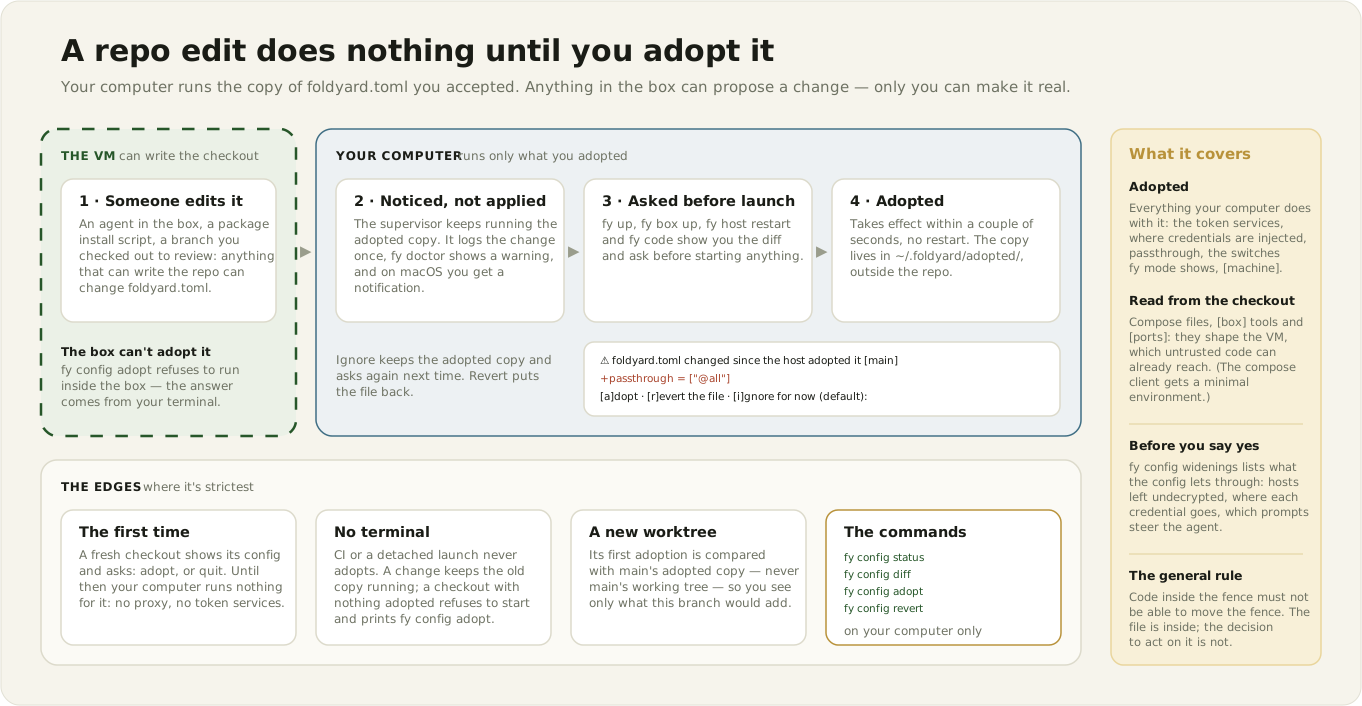
foldyard.toml and its local overlay sit inside the repo, so anything that can write the
checkout can change them: an agent in the box, an npm install script, a branch you checked out
to review. Parts of it decide what your computer does with credentials — which host an
[[inject]] switch sends its token to, which traffic passthrough leaves undecrypted. So your
computer doesn't read the working tree. It reads a copy you adopted, kept in
~/.foldyard/adopted/<checkout>-<hash>/, keyed by the checkout's path so the config can't
redirect the lookup (ADR-0022).
Day to day:
- The first
fy up/fy host restartin a fresh checkout shows its config and asks to adopt it: Enter adopts, anything else stops there. Until it is adopted, your computer runs nothing for that checkout — no proxy, no token services — andfy doctorsays so. Other commands say so up front too; the ones whose answer would be a guess (fy shellenv, and every command that acts on the stack or the box, such asfy build,fy psorfy reclaim) stop there rather than act on no config. - After that, an edit does nothing on your computer until adopted. The supervisor logs the change
once and notifies you, and
fy doctorshows a warning row. fy up,fy box up,fy host restartandfy codeask before starting anything:
⚠ foldyard.toml changed since the host adopted it [main]
  --- adopted/foldyard.toml
  +++ tree/foldyard.toml
  @@ …
  [a]dopt · [r]evert the file · [i]gnore for now (default):
adopt runs the new config (within a tick, no restart). revert puts the file back to
the adopted copy (a file the copy doesn't have is moved aside into the adopted dir, not
deleted). ignore keeps the adopted copy and asks again next time. With no terminal (CI, a
detached launch) nothing is adopted.
- The same as commands: fy config status, fy config diff, fy config adopt,
fy config revert. They run on your computer only — the box can't adopt its own config.
- fy config widenings lists what the adopted config lets through: how many hosts
passthrough leaves undecrypted (@all is about 200), where each switch delivers its
credential (including ones not switched on, and marking HELD BACK a switch that is on but
overlaps another, so the proxy injects neither), which agent prompts are shared vs personal, and
keys that are renamed or no longer honoured. A fy doctor row summarises it.
- Each worktree has its own adopted copy, since a branch may declare different plugins.
Switching branches counts as a change and gets asked about.
Scope: adoption governs what your computer does — daemons, injection, passthrough, and the
switches fy mode/the TUI show. Compose files, [box] tools and bootstrap, and ports still read
the working tree: they only affect the VM, which untrusted code can already reach.
Host state: ~/.foldyard/
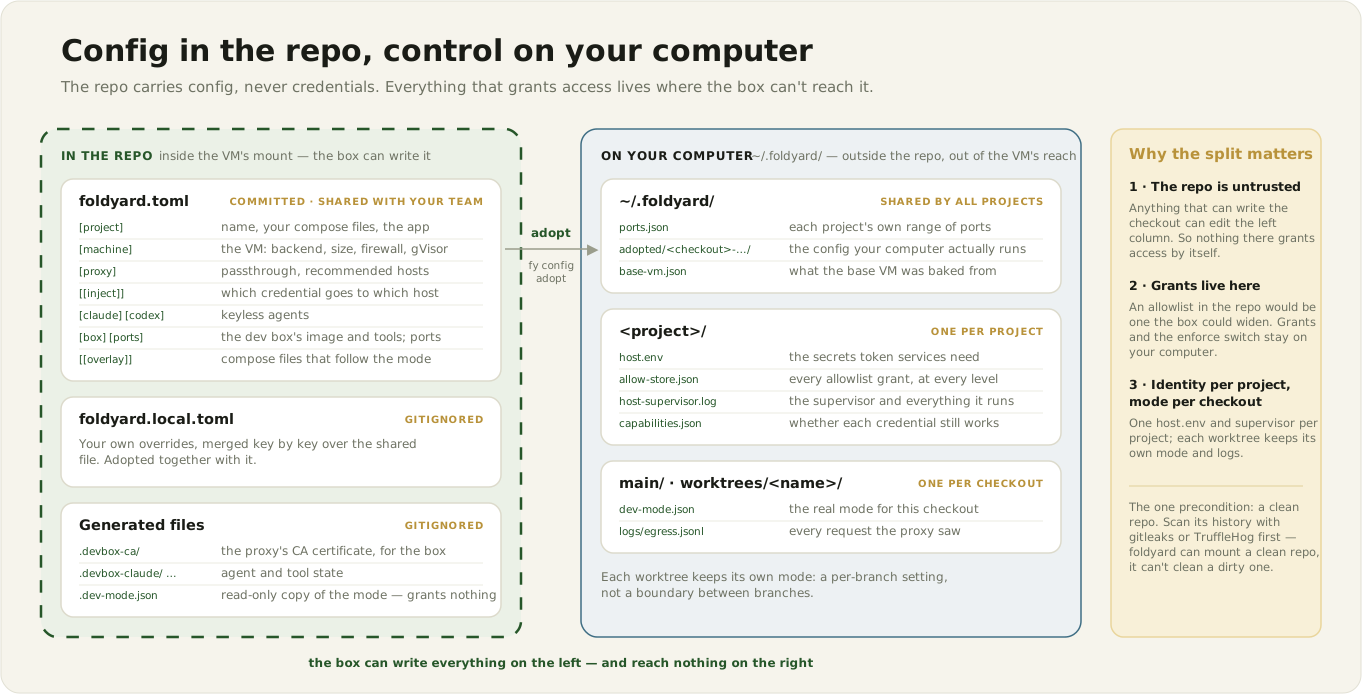
All state on your computer lives under ~/.foldyard/, outside the repo, so nothing in the VM or
box can read it or raise its own access.
Shared by all projects:
ports.json— the port-range registry. Each project gets 200 ports (first come, from 41000): proxy listeners atbase+0..89(one per worktree offset), token services atbase+100..189, the VM's ssh forward atbase+190. Stable across restarts; entries for deleted projects are harmless and can be removed by hand. Env:FY_PORTS_FILE;FY_PROXY_PORT/GCP_MINTER_PORTbypass allocation.adopted/<checkout>-<hash>/— the adopted config per checkout (see above).
Per project, ~/.foldyard/<project>/ (env FOLDYARD_STATE_DIR relocates it):
host.env— secrets and identities the token services read (App ids, captured keyless tokens, injector tokens). One per project, shared by every worktree.allow-store.json— the egress grants, at every level. Outside the repo, so the box can't grant itself access.allow-effective.json— the resolved allowlist the proxy re-reads per request (the store minus expired grants).build-tokens.json— hashed secrets for live image builds, which unlock build-only grants at the proxy.host-supervisor.log— the supervisor's combined log, including every daemon it runs.host-supervisor.heartbeat— refreshed each supervisor tick; launch verbs read its age to tell a healthy supervisor from a stuck one.capabilities.json— the latest credential-check resultsfy mode/fy stateshow.blocked-daemons.json— daemons the supervisor is holding back, with the reason.clock-offset— test-only clock skew set byfy clock; absent normally.to-box/,from-box/— the two directories the VM shares on Lima (see What the VM mounts): read-only to the box, and box-writable.main/— the main checkout'sdev-mode.json(its mode) andlogs/(per-daemon JSONL logs: proxy, token services).worktrees/<name>/— the same for each worktree, so each branch holds its own mode (a per-branch setting, not an isolation boundary — see security.md).
(An older install may still have a top-level dev-mode.json; the main checkout keeps using it
until main/dev-mode.json exists.)
In the repo, foldyard also generates gitignored files next to foldyard.toml (init adds them
to .gitignore): .devbox-ca/, .devbox-claude/ and .devbox-codex/ (transcripts, where they
are still bound into the checkout), .devbox-foldyard/, and
.dev-mode.json — a read-only copy of the mode for tools in the box. Nothing grants access based
on it.
Environment variables
Per-key overrides are listed with their keys above. The globals:
| Variable | What it does |
|---|---|
FOLDYARD_REPO |
The repo root, skipping the walk up from the working directory. |
FOLDYARD_PROJECT |
The project name (state-dir key). |
FOLDYARD_ENGINE |
The engine CLI (podman/docker). |
WORKTREE |
The active worktree; empty = the main checkout. Set in the box; inferred from the working directory on your computer. |
WT_OFFSET |
Worktree port offset, bypassing pins and the hash. |
PODMAN_MACHINE |
The VM name. |
MACHINE_BACKEND / MACHINE_VMTYPE / MACHINE_FIREWALL / MACHINE_HOST_FIREWALL / MACHINE_RUNTIME / MACHINE_MONITOR / MACHINE_CPUS / MACHINE_MEMORY / MACHINE_DISK |
[machine] overrides. |
FY_PROXY_PORT |
The proxy's base port, bypassing the port-range registry. |
GCP_MINTER_PORT |
The gcp token service's base port, likewise. |
FY_HOST_ALIAS |
The address containers use to reach daemons on your computer — for a customised Lima network with a different host gateway. |
FOLDYARD_COMPOSE_EXTRA |
Extra compose files (path-separator-joined), appended last so they win. |
FOLDYARD_NO_VERSION_NUDGE |
Silences the recommended_foldyard_version nudge. Never affects the floor or fy doctor. |
FOLDYARD_PODMAN_DESKTOP |
0/1: Podman Desktop integration off/forced on (see [machine]). |
IN_DEVBOX |
1 inside the box; what foldyard's "am I on your computer?" checks use. Set by foldyard — don't set it yourself. |
Internal / advanced
Test and CI hatches with no foldyard.toml keys; you shouldn't normally need them.
- State-path overrides —
FOLDYARD_STATE_DIR,FOLDYARD_MODE_FILE,FOLDYARD_HOST_ENV,FOLDYARD_ALLOW_STORE,FOLDYARD_ALLOW_FILE,FOLDYARD_BUILD_TOKENS,FOLDYARD_LOG_DIR,FOLDYARD_SUPERVISOR_LOG,FOLDYARD_HEARTBEAT_FILE,FOLDYARD_CAPABILITIES_FILE,FOLDYARD_BLOCKED_DAEMONS_FILE— each repoints one of the state files above. FOLDYARD_CLOCK_OFFSET— clock skew in seconds, overridingfy clock's file.FOLDYARD_LOG_TAIL_BYTES— how much of each JSONL log's end the TUI reads (default 256 KiB).FOLDYARD_CHECKOUT/FOLDYARD_ENV_OVERRIDE— set by foldyard for the stack: the checkout it mounts (main or a worktree) and the per-checkout env-override file.