Modes — no credentials by default, access on demand
The VM starts with zero credentials, and that never changes by accident. When you need real access — logs from your cloud project, a GitHub App that can comment on PRs, a coding agent using your API key — you set a mode, and foldyard's processes on your computer make exactly that much access available. Turn it off, or let the TTL run out, and you're back to zero.
This page covers the model, the commands, and what actually enforces it. Terms in bold are defined in the glossary.
The model: switches and levels
![Modes: each switch has levels from a zero-secret default upward, for example gcp off, logs, sa and user (an emergency level with a one-hour timer), an [[inject]] github switch off or on, and a keyless claude switch off or on. You set the mode with fy mode on your computer; it is stored outside the repo, one per worktree; the supervisor starts or stops token services and updates the proxy; the box sees only a read-only copy. When a timer runs out the switch returns to its default.](../assets/foldyard-modes.svg)
A mode is a set of switches, each at a level. A switch is one credential mechanism
(gcp, claude, or one you declare — github, say). A level is one setting of that switch,
from its default up to the most privileged, e.g. gcp=off|logs|sa|user, or a declared
switch's plain off|on.
The first level is always the zero-secret default. It is also what an unset, invalid or expired
value reads as. Credential switches call it off. A switch whose default is a choice rather than
a toggle names it for what it is (a storage switch might default to local).
fy mode                        # show every switch, its level, token services, TTLs
fy mode github=on              # set a mode (on your computer only)
fy mode github-user=on ttl=30m # an emergency level: TTL required (default 1h, max 8h)
fy tui                         # the same, as a live dashboard with one-key changes
fy mode works inside the box too, so you can always see the mode. Setting it works only on
your computer, by design (see below).
Where your switches come from
Switches come from plugins, and a plugin adds nothing until your foldyard.toml declares it.
Built in:
[[inject]]— oneoff | onswitch per entry. The entry'skindsays how its credential is made: a static token, a GitHub App installation token (github-app), or your ownghtoken (gh-cli, always an emergency switch) — configuration;claudeandcodex— only when you configure keyless auth (below).
Everything else — cloud identity, auth simulators, LLM routing — comes from plugins your project
opts into. No plugin in the config, no switch on the dashboard. So fy mode shows your
project. For example, one project with its own cloud, auth and LLM plugins sees
gcp=off|logs|sa|user and llm=off|record|live next to its github row. Those levels come
from that project's plugins, not from foldyard.
A GitHub App switch carries whatever the App's installation grants: foldyard asks for no narrower scope and caps none. So the place to change what the box can do on GitHub is the App's settings on github.com, and a 403 from GitHub names the permission the App is missing. A second scope is a second App with its own switch.
Enforcement happens on your computer
A mode is what you want, not a credential. It is stored in two places:
- The real mode:
~/.foldyard/<project>/…/dev-mode.jsonon your computer. It is outside the repo mount, so nothing in the VM or box can raise its own access by editing a file. Onlyfy modeon your computer writes it. - The mode mirror: a gitignored
.dev-mode.jsonin the checkout, refreshed on every mode change and every supervisor heartbeat, so the box can see the mode. Nothing grants access based on it.
What grants access are the token services and the proxy, run by the supervisor: one
background process per project on your computer. fy up / fy box up start it with the VM, and
fy machine stop stops it with the VM.
fy host— is it running current code, and which services are up;fy host restart— replace it;fy host logs -f— follow its log.
A newer launch replaces an old supervisor by itself. The supervisor re-reads the mode every couple of seconds: raise a level and the token service starts, lower it and the service stops.
That is the whole security story in one line: no token service running means no credential flows, whatever any file in the VM says.
Tokens never enter the box
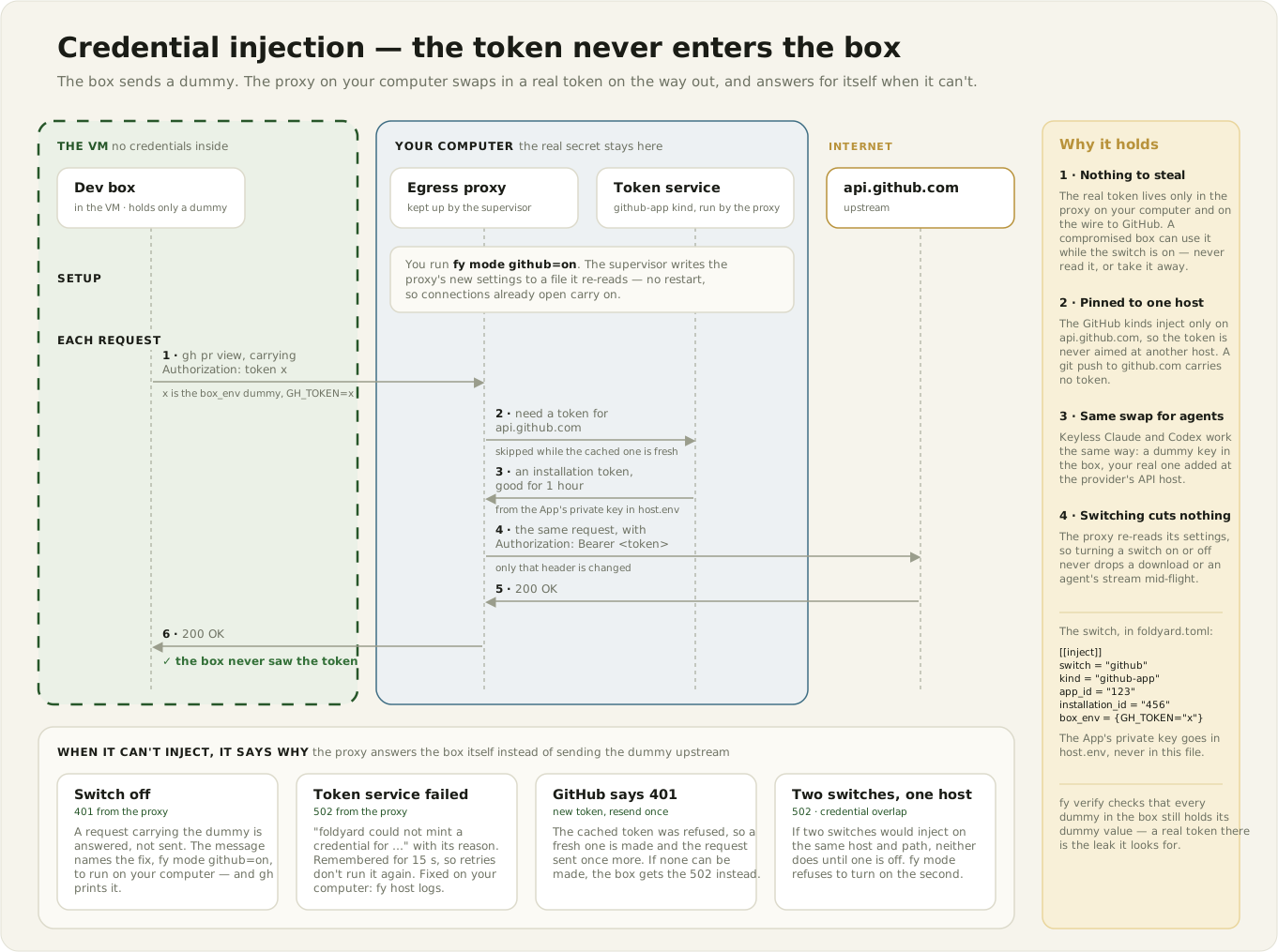
When a switch is on, its token service makes short-lived, scoped tokens on your computer, and the
proxy adds them to requests as they pass through. The API sees the credential; the box never
does. (The exception is the gcp switch: its metadata emulator hands code in the box a token of
an hour or less, as Google's own metadata server would — see gcp.md.) The secrets
token services need live in ~/.foldyard/<project>/host.env (readable only by you, outside the
repo).
Two guard rails keep this honest:
- Emergency levels switch themselves off. An emergency level acts as you (your own identity,
push access), so it always has a TTL. A
ttl=on a command that turns on no emergency level is refused, not ignored. An[[inject]]switch becomes one withemergency = true(configuration). Everything treats an expired TTL as the default level, and the supervisor stops the token service and writes the switch back to its default. If that would leave a dependent switch in a combination that can only fail, the same write lowers that one to its default too (the supervisor logs it). So an expiry always lands on a mode that works offline. - Combinations that can't work are refused. Some levels only work alongside another switch's
level.
fy modechecks the whole resulting mode and refuses a combination that can't work. The error includes the exactfy mode a=x b=ycommand that fixes it (updates apply together). Combinations that work but are probably a mistake print a warning and apply. - One credential per host, path and header. Two switches whose levels would both inject on
the same host and path (a path prefix under the other's, or either covering the whole host)
can't be on together unless the request itself says which credential it wants: each writes a
different header (or query parameter) and the box holds a placeholder for each. Then the proxy
injects only the credential whose placeholder the request carries in that switch's header, and
answers a request carrying neither or both with a 502 naming both switches (the Network Log
marks the row
no credential named) — keylessclaudeon its OAuth token beside an[[inject]]row writingx-api-keyis the case this is for (configuration). Otherwise the proxy would have to pick one credential, and only rule order would decide which, sofy moderefuses the second and names the first: turn that one off first (or swap in one command,fy mode <other>=off <switch>=on). One switch may still split a host by path, as Codex on a ChatGPT subscription does. If such a pair is on anyway (a state file an older foldyard wrote, or an[[inject]]row adopted while both were on), the proxy injects neither until one is off. The supervisor logs it and notifies you,fy mode,fy stateandfy doctorshow it, andfy config wideningsmarks both rowsHELD BACK. A request from the box to that host and path isn't sent: the proxy answers it with a 502 whose JSONmessageis the same text, naming both switches and thefy modecommand to run on your computer, rather than let the box's placeholder draw the provider's 401. The Network Log marks the rowcredential overlap.
DEGRADED — the switch is on, but the credential stopped working
What you see:
gcp sa … ⚠ DEGRADED — impersonation of app-runtime failing: … <the fix>
on fy mode, fy state, the TUI (as a banner on the Mode tab), and as the last lines of
fy up's summary.
What it means: the mode says what you want; whether the credential behind it works right now is a separate fact. A cloud login expires, a time-limited permission grant runs out, a token is rotated. Plugins add capability probes for their active levels, the supervisor runs them each tick, and a failing one shows as DEGRADED — instead of as 401 errors an hour later.
What to do: run the fix the probe names, for example re-running your cloud login. The switch recovers in place; you don't need to set the mode again.
A lapse never changes the mode (what you asked for survives and recovers in place), and a probe never grants anything.
Because you're probably not watching fy mode when a credential lapses mid-session, the
supervisor also reacts when a switch goes DEGRADED or recovers:
- It posts a desktop notification (macOS only today:
terminal-notifierif installed, elseosascript). The DEGRADED one carries the fix. Turn them off with[host] notifications = false. - On recovery, it recreates the services listed for that switch in
[resnapshot_on_capability]. Some services read credentials once at startup and keep them; they only pick up a recovered credential by starting again. They are recreated from the current mode rather than restarted, so one still on an older mode's settings catches up as well. A listed service that crashed while the credential was failing — say it exited because its startup fetch failed — comes back too; one you stopped stays stopped. So your only job is the fix the notification names; the recreate is automatic.
Neither reaction grants, blocks or changes the mode.
BLOCKED — the token service never started
What you see:
gcp sa … [GCP SA-token service: :8188 ○ BLOCKED — needs GCP_KEY — set in ~/.foldyard/…/host.env]
on the same places as DEGRADED, plus one notification when it first happens.
What it means: the supervisor refused to start the switch's token service, for one of three reasons:
| reason | typical cause | what to do |
|---|---|---|
a secret it needs is missing from host.env |
first use of a switch | add the named key to host.env |
| another program already holds its port | an editor's port auto-forward | stop that program, or the forward |
| the program failed to start | mitmproxy not installed | install what the message names |
(A leftover token service from an earlier supervisor run is cleaned up automatically, not reported.)
BLOCKED replaces ● up: with another program on the port, a connection check would succeed, and
"up" would be wrong. A token service that started and then crashed is not BLOCKED — the
supervisor log (fy host logs) has its exit code.
fy state — every layer, wanted vs actual
The mode lives in several layers that refresh at different times: the real mode file, the box's
mirror, the environment baked into running containers, the token services, and the credential
checks. fy state prints one row per layer — what the mode wants, then what is actually there —
and exits non-zero if any disagree:
  ✓ mode        gcp=sa llm=record
                → authoritative (…/dev-mode.json)
  ✗ daemons     gcp-minter listening on :41100
                → DOWN — `fy host restart` on the host
  ✗ capability  gcp=sa capability chain works
                → DEGRADED — … <the fix>
  ✓ stack       overlays: compose.identity.yml, compose.llm.yml
                → 14 containers match the rendered config
  ✓ box         dev box env matches the config
                → current (or box down)
The ✗ row tells you which layer is stale and how to fix it.
The stack row asks the same question fy up does: compose records a hash of each service's
rendered config on its container, and a container is stale when that hash differs from a fresh
render of the current mode. So it catches a change that only alters a value the mode fills in
(no overlay added or removed), and it never flags a container the change doesn't touch. When a
container is stale, the row names it and, where it can, the overlay it is missing. If the fresh
render isn't possible, the row says unknown rather than ✓.
Testing all of this without secrets
The [plugins.fakecred] test switches and fy clock (fast-forward the clock) exercise
everything above — expiry, dependent switches lowered with it, probes going DEGRADED and
recovering, token services starting and stopping — on a real machine with zero credentials. See
testing-modes.md.
Keyless agents
If you run a coding agent in the box with keyless configured ([claude] or [codex]), you get
an on/off switch for it:
fy mode claude=on
The first fy box up after you configure keyless asks once, on your computer, with a hidden
prompt: paste your key or token. foldyard recognises its kind from the prefix and stores it in
host.env. The box gets only a dummy credential — enough to make the client send an auth
header — and the proxy replaces that header with the real value in flight. The real value is
never typed in the box, never in the repo, never in scrollback.
| keyless mode | dummy in the box | header the client sends | proxy rewrites on | real value lives in |
|---|---|---|---|---|
[claude] api-key |
ANTHROPIC_API_KEY env |
x-api-key |
api.anthropic.com |
host.env |
[claude] oauth |
CLAUDE_CODE_OAUTH_TOKEN env |
authorization: Bearer … |
api.anthropic.com |
host.env |
[codex] api-key |
OPENAI_API_KEY env |
Authorization: Bearer … |
api.openai.com |
host.env |
[codex] chatgpt |
a dummy ~/.codex/auth.json |
Authorization: Bearer … |
chatgpt.com (codex's API + workspace-discovery paths) |
your real auth.json on your computer, refreshed by the token service |
With the switch off, the box holds only the dummy and can't reach the provider at all. The
proxy doesn't forward the dummy either: it answers the request itself with a 401 whose message
names the fix (fy mode claude=on, run on your computer), so the agent shows that instead of
the provider's "invalid token". The Network Log marks those rows as held.
An [[inject]] row with a box_env dummy gets the same answer while its switch is off: a
request to the row's host (and path_prefix) carrying the dummy, as the bare value or after one
auth scheme (gh sends token x, most clients Bearer x), gets a 401 whose JSON message
names the switch and the fix (for a github row, fy mode github=on on your computer), which
gh prints. Any other request to that host goes on as usual: a public call with no credential,
or a credential the box got some other way (configuration).
With the switch on, the token service on your computer can still fail (a missing or rejected
secret, a provider outage). The proxy then doesn't send the request at all: it answers with a
502 whose message names the host and the token service's own reason, so the agent sees
"foldyard could not mint a credential for …" rather than the provider's 401. If the provider
instead refuses a token already sent and a fresh one can't be minted, its 401 is replaced by the
same kind of 502. The reason is the token service's diagnosis (its error output, with anything
token-shaped redacted). The fix is on your computer — fy host logs has the details — and the
Network Log marks the row mint failed. A failure is remembered for 15 seconds: requests (and a
client's retries) in that time get the same 502 at once, without running the token service
again, and fy host logs gets one line per attempt. Pasting a missing secret into host.env
takes effect straight away. A slow token service holds up only the requests that need its
credential; the rest of the box's traffic carries on.
fy claude and fy codex check first: with the agent's switch off they say so before
launching and, in a terminal, wait for you to switch it on from your computer (Enter launches
anyway). That covers starting a session; the proxy's answer covers the rest — a time limit
running out mid-session, or an agent started some other way — and the first such answer per
switch also raises a notification on your computer.
Codex on a ChatGPT subscription shows the proxy's message only in passing (a failed model-list
refresh), then stops on its startup workspace discovery, which reports any failure as a fixed
workspace routing discovery unauthorized (401) without the reply's text. While codex is
off, that error means the switch — the Network Log's held row says so, and your computer gets
a notification the first time it happens. Discovery can also point a workspace at a backend other than
chatgpt.com (the account decides; a personal one stays there); keyless injects only on chatgpt.com, so Codex
can't reach such a backend through the proxy.
One caveat: adding, removing or changing keyless in the config adds or removes the dummy in
the box's environment, which takes a fy box up to apply. The dashboard tells you when the
running box is out of date. Switching the mode itself never needs a box restart.
Per-worktree modes
Each worktree has its own mode: its own mode file, its own mirror, its own token-service ports.
One branch can sit at github=on while another stays fully offline. What's shared is identity:
one host.env, one proxy CA, and one supervisor serving every worktree whose box is up.
Modes update the running stack
A mode can shape your compose stack: enable a profile, layer an overlay,
set an environment variable a service reads. When you change the mode, foldyard re-creates the
affected services of a running stack for you — no manual down/up. A mode change never
starts a stack that wasn't running. Recipes pick up mode-derived variables as defaults
(${K:-v}), so anything you export yourself still wins.
Writing your own switch
For a header-injected credential, you don't need code: declare an [[inject]] entry
(configuration). Anything more is a small plugin: declare the switch
and its levels, and contribute the token services, proxy rules, environment and doctor checks it
needs. fy mode, fy host, the TUI and fy verify pick it all up. There is no plugin guide
yet; the API is documented in
src/foldyard/plugins/__init__.py.