Networking — the proxy, the allowlist, and the firewalls
The box sends its internet traffic through a proxy on your computer. This page covers how that works day to day: what gets logged, how to watch and control it, and — the part that matters for trust — which guarantees are cooperative and which are enforced. Terms are defined in the glossary.
How traffic leaves the box
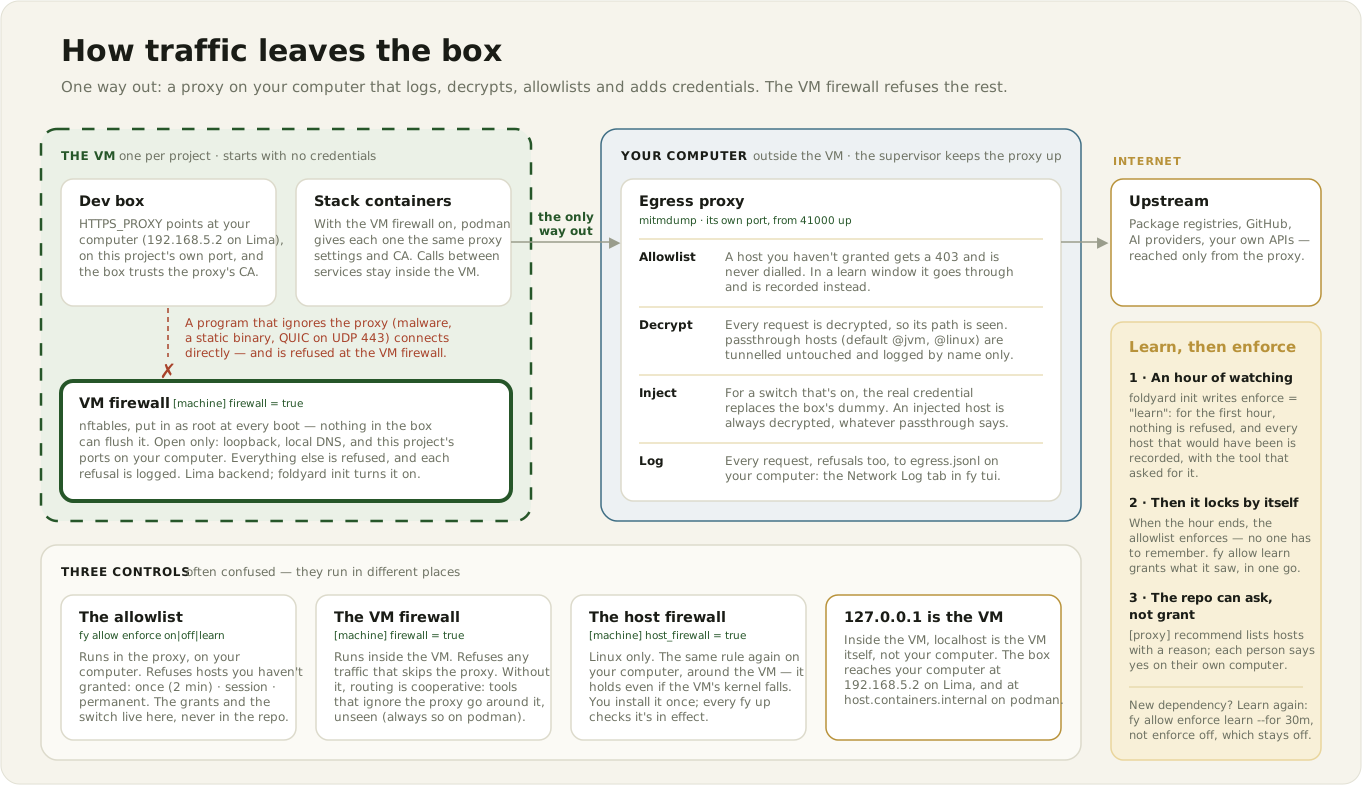
The box routes through an always-on mitmdump proxy on your computer, configured by the
[proxy] table. fy up / fy box up start the supervisor that runs it; fy host shows its
status.
Routing uses the standard proxy environment variables (HTTPS_PROXY etc.) plus a CA certificate
the box trusts, both set when the box is created:
- the proxy's CA is added to the box's system trust store (curl, wget and apt all verify
against it), and
NODE_EXTRA_CA_CERTSadds it to Node's roots; REQUESTS_CA_BUNDLE,GIT_SSL_CAINFO,SSL_CERT_FILEandCLOUDSDK_CORE_CUSTOM_CA_CERTS_FILE(gcloud's own transports:gsutil,bq) point at a combined bundle (system roots + the proxy CA), so both decrypted and passed-through connections verify.NODE_USE_ENV_PROXY=1makes Node'sfetch()use the proxy, andnpm_config_https_proxy/npm_config_proxycover install scripts that bring their own HTTP client (Node and npm).- A browser's own store (Chromium/Playwright's NSS database) ignores all of these: import the CA
once (
certutil -d sql:$HOME/.pki/nssdb -A -t "C,," -n foldyard-proxy -i /etc/dev-proxy-ca.pem) or the page fails withERR_CERT_AUTHORITY_INVALID.
How strong "routes" is depends on your setup. Only the lima backend with [machine] firewall =
true enforces that all traffic goes through the proxy. Without the VM firewall, routing is
cooperative: well-behaved software honours the proxy variables, anything that ignores them
goes around. See Blocking, not just watching.
Each project — and each worktree — gets its own proxy port from a cross-project port registry
(~/.foldyard/ports.json). Two stacks never share a listener, and a token meant for one worktree
can't be read through another's proxy.
Traffic between your services (by container name) never touches the proxy: it's on NO_PROXY
and stays inside the VM.
The log
Every proxied request is logged to egress.jsonl in that worktree's state folder on your
computer (~/.foldyard/<project>/main/logs/ for the main checkout). It is outside the repo on
purpose, so nothing in the VM can read or rewrite it. Watch it in the Network Log tab of
fy tui (grouped by host), or tail -f the file.
The log is bounded:
- past
PROXY_LOG_MAX_BYTES(default 5 MiB) it rotates into dated backups; - the newest
PROXY_LOG_BACKUPS(default 5) backups are kept; - the TUI reads only the last
FOLDYARD_LOG_TAIL_BYTES(default 256 KiB), so a big log never slows it down.
What gets decrypted: everything but the trusted toolchain
The proxy decrypts and logs every request — method, host, path, status — except hosts on your
[proxy] passthrough list. Those are tunnelled with their real certificates and logged as one
row per connection (the hostname, no path).
Entries are exact hosts, *.suffix globs, or @bundle names (@anthropic, @vcs, @node, …;
@all is every bundle). The default is ["@jvm", "@linux"]: only what still breaks under
decryption — Java's own trust store (Maven, Gradle) and apt over HTTPS, which reads only the
image's store. Everything else is decrypted and logged: the box, your stack's containers, image
build steps and the VM's image pulls all trust the proxy's CA, and decrypting a toolchain install
measured within a few per cent of tunnelling it. (One exception: a build started on your computer
is tunnelled whatever the list says, and logged as tls tunnel rows — see
Image builds below. A build started inside the box is decrypted like the box.)
Set passthrough = ["@all"] to tunnel the whole toolchain as before, or add only the bundle a tool
needs. A host whose credential the proxy injects (say api.github.com with github=on) is always
decrypted, whatever the list says, so its auth header can be replaced.
Decryption can't be switched off (ADR-0029): it costs
about 3 ms per new connection and caps one checkout's decrypted throughput around 600 MB/s,
and seeing paths is what makes the log useful. A host that breaks
under decryption (it pins its certificate, needs a client certificate, or ships its own trust
roots) goes on the passthrough list instead.
Because a passthrough host escapes this monitoring, your computer doesn't read the list from the
checkout while the VM runs. Like the rest of foldyard.toml, it uses the copy you adopted. An
edit takes effect when you accept it at the next fy up or fy host restart (fy config diff,
fy config adopt, fy config revert; ADR-0022).
Decryption involves no credential. It works alongside the credential switches (see modes.md) but doesn't depend on them.
A token service never fetches through the proxy it feeds. If the shell that started the
supervisor exports HTTPS_PROXY pointing at foldyard's own proxy, the GitHub App token service
would send its request through the very rule it is making a token for, and the proxy would
replace the App's sign-in header on api.github.com with the token being asked for. So foldyard
tells it its own proxy port, which it skips. Any other proxy your computer exports (a corporate one) is still
used, since it may be the only way out.
Blocking, not just watching
Three separate controls, often confused:
| control | where it runs | what it does | set by |
|---|---|---|---|
| the allowlist | the proxy, on your computer | refuses hosts you haven't granted | fy allow enforce on\|off\|learn ([proxy] enforce seeds it) |
| the VM firewall | inside the VM | refuses any traffic not going through the proxy | [machine] firewall = true (lima backend) |
| the host firewall | on your computer (Linux) | refuses the VM process's own traffic, except to the proxy | [machine] host_firewall = true |
The allowlist
When enforcement is on, the proxy refuses any host that isn't granted. fy allow enforce
on|off|learn is the switch. [proxy] enforce in foldyard.toml only sets the answer for the
first run, before your computer has one of its own.
A refused HTTPS request still shows what was asked. The proxy answers the box's CONNECT itself,
decrypts the tunnel, and returns the 403 to the request inside, so the Network Log names its
method, path and User-Agent. No connection to the refused host is ever opened: the proxy refuses
any connection to a host nothing grants, whichever part of it asks. Three cases still see only
CONNECT host:port, with no path:
- another port than
:443(github.com:22): the tunnel isn't HTTPS, so there is no request to read; - an image build: it doesn't trust the proxy's CA, so it is refused before TLS;
- a client in the box that doesn't trust the proxy's CA (a pinned certificate, its own CA
bundle): its TLS handshake fails, with a certificate error rather than the readable
403.
Learn first, then enforce. fy init sets enforce = "learn". The first fy box up / fy up
opens a one-hour window where:
- nothing is refused;
- the proxy records every host it would have refused, with the User-Agent that asked
(
npm/10.8.2,uv/0.8,git/2.45), so you can see which tool wanted it; - when the window ends, enforcement turns on by itself.
Then fy allow learn lists what was recorded, grants it in one go, and prints [proxy] recommend
lines you can commit to share the hosts with your team. Each line's why is what the box was
seen doing (observed: npm/10.8.2 GET /react, /@types/node (+4) — edit me), taken from the
User-Agent and the first path segments of the requests (never a query string). That text comes
from box traffic: replace it with the real reason before committing, since teammates read it
when asked to grant the host.
For a new dependency, open another window with fy allow enforce learn --for 30m. Prefer that to
fy allow enforce off, which also only watches but stays off until someone remembers to turn it
back on.
Grants are stored on your computer, never in repo config:
fy allow add <host> [--level once|session|permanent](defaultsession);fy allow sync [--yes]for the hosts the repo recommends;- one keypress on a blocked row in
fy tui's Network Log.
Both the grants and the enforcement switch live on your computer for the same reason: the box can write repo config, so an allowlist in the repo is one the box could widen or switch off. Keyless agent hosts are always allowed — never list them.
The VM firewall
[machine] firewall = true (lima backend; fy init turns it on) makes the proxy the only way
out. It sets up nftables rules inside the VM, as root at boot, that refuse everything else. So
software that ignores proxy variables — malware, static Go binaries, raw sockets — gets nothing
instead of a direct route.
Without the VM firewall, routing is cooperative. Proxy variables are honoured by well-behaved software and ignored by anything else:
backend = "lima"+firewall = true— traffic control is enforced. This is the default.backend = "podman"(one shared VM) — no VM firewall is possible. The proxy sees everything that cooperates: a monitoring guarantee, not a filtering one.- QUIC/HTTP-3 (UDP/443) bypasses a CONNECT proxy entirely. With the VM firewall, it is refused. Without it, it is not captured at all.
The host firewall
[machine] host_firewall = true (Linux only; needs firewall = true) enforces the same rules
again on your computer, around the VM process itself — so even someone who took over the VM's
kernel still can't get out. foldyard never installs it for you: fy machine host-firewall prints
the rules and the sudo commands, you run them once, and every fy up checks they are in effect
(ADR-0028).
Stack containers trust the proxy too
Only with the VM firewall on ([machine] firewall = true, lima backend). Everything in this
section is set up by the firewall's boot setup. Without the firewall, your stack's containers
get neither the proxy settings nor the CA.
With it, podman hands the VM's proxy settings (HTTP_PROXY, HTTPS_PROXY and their lowercase
forms, with a NO_PROXY of loopback and the host gateway) to every container it creates — your
stack's services, and anything the box starts — so their traffic is decrypted like the box's.
They trust the proxy's CA the same way, without any change to your compose files: the VM's boot
setup installs the CA and a podman default that mounts it into every container
(/etc/fy-proxy-ca.pem, plus /etc/fy-proxy-ca-combined.pem = the VM's trusted roots and the CA)
and sets NODE_EXTRA_CA_CERTS, SSL_CERT_FILE, REQUESTS_CA_BUNDLE and GIT_SSL_CAINFO. A
second default sets npm's own proxy settings, npm_config_https_proxy and npm_config_proxy
(Node and npm).
Pointing a container at the proxy yourself needs the firewall too. The proxy always decrypts
(ADR-0029), but only the firewall gives containers its
CA. A container you route through the proxy yourself (HTTPS_PROXY in a compose file) on a VM
without the firewall fails TLS on every host not on passthrough, unless its image already
trusts the proxy's CA.
- Your settings win, even stale ones. A variable your image or compose file already sets keeps
its value, so don't restate what foldyard provides: a proxy address copied into a compose file
stops working when the port band moves, and a mount of
.devbox-ca(the copy of the CA foldyard puts in the checkout for the box) isn't needed by stack containers. An empty value isn't an override: blanking the proxy variables is how a service that only talks to the rest of the stack stays off the proxy (blanknpm_config_https_proxyandnpm_config_proxytoo if it runs npm).fy doctorhas two rows for this, both advisory: stack env overridesreads the rendered compose config and names each of these a service sets, even to foldyard's own value, since a restated value goes stale when the port band moves.stack container envreads what each running container actually has, whatever set it. It names a CA variable an image sets for itself (anSSL_CERT_FILEof its own), a different proxy address, and a container that uses the proxy but lacks the CA or npm settings. podman adds foldyard's settings when it creates a container, so one created before the VM had them (or before a foldyard upgrade added one) lacks them until it's recreated:fy down, thenfy up(named volumes are kept). A container that blanks the proxy variables isn't flagged.
To undo an image's ENV, set foldyard's value in the service's compose environment (an image
can't be told to drop it). The container row is then clean, and the compose row notes the
restated value. That's expected; a restated CA path stays right, while a restated proxy address
needs updating if the port band moves.
- An image that trusts a private CA of its own (a corporate root baked into its system store)
keeps it only where the connection goes through the proxy decrypted: the proxy presents its
own certificate there. A connection that bypasses decryption (a passthrough host, or TLS
between your stack's services) reaches the private CA's certificate directly, and
SSL_CERT_FILE, REQUESTS_CA_BUNDLE and GIT_SSL_CAINFO replace the store a client reads
(NODE_EXTRA_CA_CERTS adds to it). Set those variables in the image or compose file to a
bundle holding both your CA and /etc/fy-proxy-ca.pem, built at container start, and yours
win.
- Build steps too. podman gives a build's RUN step the CA files but not those variables,
so the VM's boot setup puts a small wrapper in front of the container runtime that adds them
when a container (a build step included) has the CA mounted and doesn't set them itself. A
RUN step's curl, apk, pip, uv, npm and git then work against a decrypted host,
and installing ca-certificates in a step still works (nothing is mounted over the system
store). Nothing is written into the image: the variables exist only while the step runs. An
ENV in your Dockerfile wins, as it does for running containers. A build step also gets
NODE_USE_ENV_PROXY=1 (Node and npm), so Node 24's corepack reaches the
registry with no ARG for it. npm's proxy settings aren't added: a build gets its own proxy
URL (below), so a step whose install script
needs npm's spelling writes
RUN npm_config_https_proxy="$HTTPS_PROXY" npm install.
- Clients with their own trust store ignore those variables, in the box as in a container.
Add the CA to that store in your image, or put the host on passthrough:
- a Java keystore, or a browser's NSS database;
- a GnuTLS client (Debian's apt over HTTPS, wget), which reads only the image's system
store;
- a Rust binary with its CA roots compiled in. Turbopack is one: next build fetching Google
Fonts fails with Failed to fetch `<font>` from Google Fonts even though the host is
allowed, because it ignores NODE_EXTRA_CA_CERTS.
NEXT_TURBOPACK_EXPERIMENTAL_USE_SYSTEM_TLS_CERTS=1 makes it read the system's roots
instead, which honour SSL_CERT_FILE (the combined bundle). Set it in the service's compose
environment and in [box].env; foldyard doesn't set it for you, since it belongs to one
framework and its name says experimental.
- Image pulls trust it too. The same boot setup adds the CA to the VM's own trust store,
which podman checks image pulls against, so a registry the proxy decrypts still works. Turning
the VM firewall off takes it out again.
- A new CA needs a restart. The CA is part of the VM's boot setup, so after it changes run
fy machine stop && fy up. The old CA is replaced, not kept beside the new one. Without the VM
firewall nothing is routed through the proxy, so nothing is needed.
Node and npm
Node needs more than the standard proxy variables, and every Node project runs into it:
fetch()ignoresHTTPS_PROXY. Node's built-infetch()(undici) goes direct unlessNODE_USE_ENV_PROXY=1is set. Under the VM firewall a direct request is refused, and the error is anECONNREFUSEDagainst a raw IP address, with nothing naming a proxy. The variable needs Node 24.0 or 22.21 and later; older Node ignores it, sofetch()still goes direct. There, upgrade Node, or have the app route undici through the proxy itself (setGlobalDispatcher(new EnvHttpProxyAgent())from theundicipackage).- Install scripts bring their own HTTP client. One that fetches with node-fetch (supabase's
postinstall downloading its CLI) reads only npm's
npm_config_https_proxy.
What foldyard sets:
| where | NODE_USE_ENV_PROXY=1 |
npm_config_https_proxy, npm_config_proxy |
|---|---|---|
| the box | yes | yes |
| stack containers (VM firewall on) | no | yes |
| image build steps | yes | no |
In the box, all three are defaults: [box].env may override any of them. With
NODE_USE_ENV_PROXY, Node honours NO_PROXY like curl does, so a stack service the box calls by
name has to be in [proxy] no_proxy (it already had to be for curl and Python).
Why not in stack containers. podman gives every container HTTP_PROXY with a NO_PROXY of
only loopback and the host gateway. Node ignoring it is what lets one Node service reach another
by service name (Supabase Studio calling http://kong:8000). Set everywhere, those calls would
go to the proxy, which runs on your computer and can't resolve a stack name.
An app container that calls the internet from Node sets it itself, with a NO_PROXY naming
the stack services it calls:
environment:
  NODE_USE_ENV_PROXY: "1"
  # Both cases: podman injects a lowercase no_proxy of its own, and undici prefers it.
  # Keep podman's entries (loopback and the host gateway, 192.168.5.2 on lima).
  NO_PROXY: localhost,127.0.0.1,192.168.5.2,kong,db
  no_proxy: localhost,127.0.0.1,192.168.5.2,kong,db
Leave the proxy address, the CA and npm's settings out: foldyard provides them, and a copy goes stale when the port band moves.
Image builds: trusted, still behind the allowlist
With the VM firewall on, image builds (fy box build, and the stack build fy up runs) also go
out through the proxy. How that works:
- Tunnelled, not decrypted, when started on your computer. foldyard gives the build a
proxy URL carrying a secret it creates for that build (user
fy-build, the secret as the password), and the proxy tunnels those connections. The log shows them astls tunnelrows flaggedbuild. - The allowlist still applies. Being a build changes what is decrypted, never what the runtime allowlist allows (ADR-0029).
- Only a build started on your computer is one. The
fy-builduser without a live secret counts for nothing, so a program in the box can't use it to hide what it fetches. A build you start inside the box (fy upthere, orpodman build) is the box as far as the proxy is concerned: decrypted and logged like any box request. Its steps trust the proxy's CA (below), so it works the same either way.
When the allowlist refuses a build, the tool's error names the URL it asked for, which is often
not the host that was refused: a CDN can redirect inside the tunnel (Playwright's
cdn.playwright.dev sends browser downloads to storage.googleapis.com). So foldyard reports the
refused hosts itself:
- On your computer, with a terminal, it asks about each refused host: once (15 minutes, long enough for the build), session, permanent, or no.
- It builds again. The layer cache makes that cheap. A redirect chain reveals one more hop per attempt, up to 4 attempts.
- It offers to add what you granted to
foldyard.toml's[proxy] recommendaswhen = "build"entries (keeping the file's comments). If the checkout matched the config your computer runs, the edit is adopted at once; otherwise it waits for the adoption prompt at the nextfy up. Eachwhyrecords what was seen: reword it before you commit. - Without a terminal, it prints the
fy allow add … --buildcommands instead. - Inside the box, it does nothing: grants are made on your computer.
Build grants are for builds only. The box can't use them, so the box's allowlist stays as
narrow as before. A build proves it is one with a secret foldyard creates for that build (the
password in its proxy URL, stored on your computer only as a hash, revoked when the build ends).
The public fy-build user alone unlocks no build grant, so neither the box nor a build started
inside it can use one. fy allow add <host> --build makes
the same kind of grant by hand, and fy allow list shows build grants separately.
when = "build" recommendations aren't offered at fy up (every launch would ask about a host
only a build needs). A teammate is offered them, with their why, when their own build is
refused.
A tool that ignores the proxy settings never reaches the proxy at all. It connects directly,
the VM firewall refuses it, and the Network Log has no row for it, so there is no host to grant.
Node's built-in fetch is the common case, which foldyard covers in build steps
(Node and npm): Node 24's corepack (0.35 and later) uses it.
When a build fails, foldyard also reads the VM firewall's recent refusals. It lists any made while the build ran, by destination IP and port, so "nothing was refused at the proxy" gets an explanation. The firewall can't tell the build's connections from the box's, so the list covers anything walled in the VM during that time. Other tools to suspect: a postinstall script with its own HTTP client, or a program opening raw sockets.
When something's off
- A build fails at the network and nothing was refused at the proxy. The tool connected directly and the VM firewall refused it. See "A tool that ignores the proxy settings" under image builds above. The build's output lists what the firewall refused.
- The Network Log is empty. The box may be missing the proxy variables or the CA — recreate
it once (
fy box down && fy box up). The log only shows a request once it gets a response, so a failing TLS handshake (CA not trusted) shows nothing. - Node fails with
ECONNREFUSEDagainst a raw IP address. Itsfetch()went direct instead of through the proxy, and the VM firewall refused it. The box setsNODE_USE_ENV_PROXY=1; a stack container has to set it itself (Node and npm). - Every request in the box suddenly refuses to connect. The box routes through the proxy, so
a dead proxy means no traffic out.
fy doctorhas an "egress proxy" check for this, andfy uprestarting the supervisor is the usual fix. - A request gets a 502 from foldyard rather than from the service. The proxy answers a
request itself, without sending it, when the credential it should carry can't be had: the
token service on your computer failed (
mint failedin the Network Log; the message quotes its reason, and the same answer is repeated for 15 seconds rather than re-running it), or two switches both claim that host and path (credential overlap; the message names thefy modecommand that ends it). Both are fixed on your computer, never in the box (modes.md). Only that credential's requests are affected; a slow token service doesn't hold up the box's other traffic. - A build or tool needs a host you haven't allowed. Watch the TUI's blocked rows and grant from
there (
a), or runfy allow add <host> --level permanent. Grants live on your computer, never in repo config, so the box can't widen its own allowlist. - A long, quiet request to a Google API dies at about 60 seconds. That's Google's front ends
(
*.googleapis.com), not the VM or the proxy: they close any connection that has carried no bytes for about 60 s, idle or mid-request, and TCP keepalives don't reset the timer. It measures the same from an ordinary client on the internet with no foldyard involved. Stream the response (or ask for progress output, such as a model's thought summaries) so bytes keep flowing. fy upfails withproxy already running(podman backend). That's podman machine's port forwarder (gvproxy), not the egress proxy: it still holds a forward for a host port from a stack that wasn't torn down cleanly (a crash, orrm -fon a container that publishes a port). The forward lasts as long as the VM, so everyfy uphits it until you runfy machine stop && fy up, which also stops any other project sharing that machine ([machine] name). Ending work withfy downavoids it.
Deeper
- Why transparent capture is hard on rootless podman, the options weighed, and the monitoring-vs-enforcement split: ADR-0009.
- The VM firewall's design: lima-wall-machine-integration.md.
- How kernel sandboxes like nono relate: prior-art.md.