Running a foldyard workshop
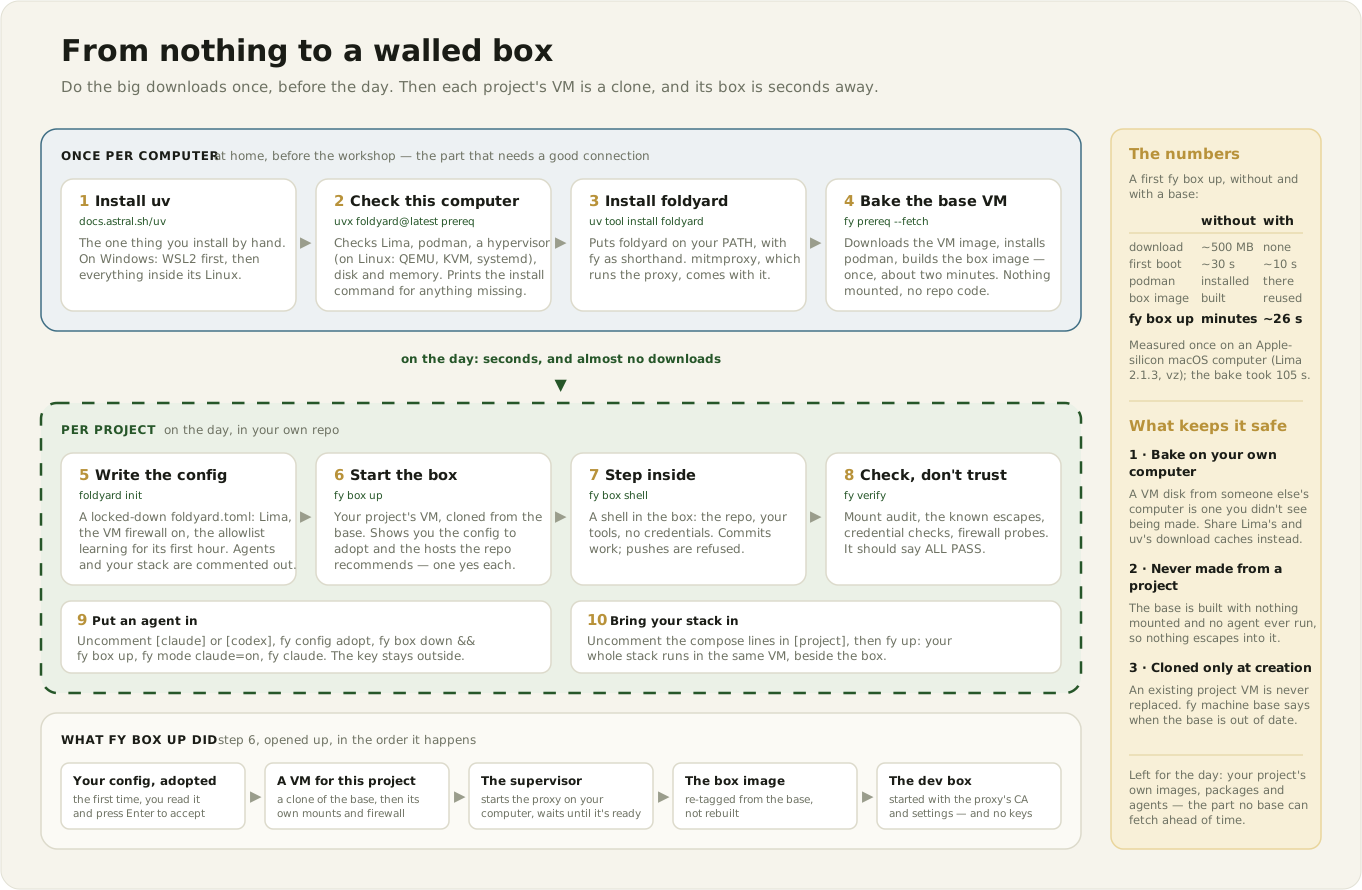
This page is for two readers. If you're organising a workshop, read all of it. If you're an attendee, your part is Before the day: about 30–45 minutes at home, mostly waiting on downloads, so the day itself goes on your project rather than on progress bars.
At the workshop, each attendee runs their own project's dev stack, and optionally a coding agent, inside an isolated VM on their own computer. The VM mounts only their repo, so their keys, home directory and other projects stay out of reach. New words (box, VM, mode, allowlist, adopted config…) are defined in the glossary.
For the organiser
- Rehearse on every platform you expect, end to end, with the foldyard version you'll ask for.
Then pin that version in the instructions you send (
uv tool install foldyard==X.Y.Z,uvx foldyard@X.Y.Z prereq), so a release in between can't change what people baked. - Send this page early, with a reply-by date for anyone whose setup fails. Most failures are a missing package or a setting, fixed in minutes by email and painful in a room.
- Plan for some machines that can't take part (below) and pair those people up.
- Talk to the venue about bandwidth. The base VM is pre-fetched, but each project's own images and packages download on the day (see Downloads).
What attendees need
- A computer you're an admin on, one of:
- macOS 13 or later with Homebrew. Apple silicon is what foldyard is used on day to day; Intel should work but hasn't been validated.
- Linux on x86-64 with hardware virtualisation: Ubuntu 24.04, Debian, Fedora or Arch.
- Windows 11 on x86-64, through WSL2.
- Machines that can't take part: Windows 10 (it doesn't pass virtualisation through to WSL2) and Windows on ARM (no KVM inside WSL2). Linux on arm64 hasn't been tested.
- Work laptops are a gamble. Device management (MDM), no admin rights, a corporate VPN or TLS inspection (Zscaler and similar) often stop the installs, or break the network path the box uses. A personal machine is the safe choice.
- 16 GB of RAM or more (8 GB works with a smaller VM, see the tips) and 30 GB of free disk.
- The repo you want to work on, checked out, with a remote called
origin(GitHub, GitLab, public or private).fy verifyuses it to prove the box can't push. - Optional, for the agent part: a Claude or OpenAI credential (step 5).
Before the day
Step 1 — install the tools
macOS. Install Homebrew if you don't have it (it also installs Apple's command-line tools, which can take a while; follow the "Next steps" it prints). Then:
brew install uv lima podman
brew upgrade lima podman        # if you already had them: foldyard needs Lima 2.0 or later
Linux. Your distribution's packages first:
# Ubuntu / Debian
sudo apt-get update && sudo apt-get install -y \
  qemu-system-x86 qemu-utils ovmf podman git curl openssh-client lsof

# Fedora
sudo dnf install -y qemu-system-x86-core qemu-img edk2-ovmf podman git openssh-clients lsof

# Arch
sudo pacman -S --needed qemu-system-x86 qemu-img edk2-ovmf podman git openssh lsof
Then, on any of them: Lima (2.2.0 is the version foldyard's CI tests), uv, access to KVM (the Linux kernel's hardware virtualisation), and a user session that keeps running:
curl -fsSL https://github.com/lima-vm/lima/releases/download/v2.2.0/lima-2.2.0-Linux-x86_64.tar.gz \
  | sudo tar Cxz /usr/local
curl -LsSf https://astral.sh/uv/install.sh | sh
sudo usermod -aG kvm $USER      # then log out and back in
sudo loginctl enable-linger $USER
Windows 11 — everything happens inside a Linux distro under WSL2:
- In PowerShell as Administrator:
wsl --install -d Ubuntu-24.04. Reboot when asked, then open "Ubuntu 24.04" from the Start menu and create your Linux user. - In PowerShell (as yourself), open WSL's settings file with
notepad "$env:USERPROFILE\.wslconfig", put this in it and save. Formemory, use about 60% of your RAM (10GB on a 16 GB laptop, 20GB on 32 GB); by default WSL takes only half.
[wsl2]
nestedVirtualization=true
memory=10GB
Then run wsl --shutdown and reopen Ubuntu. WSL reads this file only when it starts.
3. In Ubuntu, check that systemd is running: ps -p 1 -o comm= should print systemd. If it
doesn't, run printf '[boot]\nsystemd=true\n' | sudo tee -a /etc/wsl.conf, then
wsl --shutdown in PowerShell and reopen Ubuntu.
4. In Ubuntu, run the Ubuntu / Debian commands above, then the "on any of them" block. Where
it says "log out and back in", run wsl --shutdown in PowerShell and reopen Ubuntu instead.
5. Check KVM: test -w /dev/kvm && echo "KVM OK".
6. Keep your repo inside Ubuntu (say ~/code/my-repo), not under /mnt/c/…: clone it fresh
there.
7. Check the free space on C: (Explorer, or df -h /mnt/c). WSL's disk lives there, and
from inside Ubuntu it reports far more free space than C: really has.
Step 2 — let foldyard check your computer
Open a new terminal (on Windows, the Ubuntu window) so uv is on your PATH, then:
uvx foldyard@latest prereq
The @latest matters: uvx caches tools, so without it anyone who ever ran uvx foldyard
gets that old copy. (If your organiser named a version, use uvx foldyard@X.Y.Z prereq.)
It checks Lima, podman, a hypervisor, and on Linux QEMU, KVM and a systemd --user session, plus
disk and memory. It installs nothing: for each problem it prints the command that fixes it. Fix
every ✗ line and run it again. ⚠ lines are advice; ℹ lines are optional.
Step 3 — install foldyard and do the big download
uv tool install foldyard        # or foldyard==X.Y.Z, if your organiser named a version
uv tool update-shell            # only if `fy` isn't found afterwards; then open a new terminal
fy prereq --fetch
--fetch bakes the base VM: about 1 GB of downloads, once. On the day, your project's VM is
a copy of it, made in seconds (base-vm.md explains how). If it fails partway,
usually on a slow Fedora download mirror, run fy prereq --fetch again.
Don't upgrade Lima, podman or foldyard between now and the workshop (watch out for a blanket
brew upgrade or system update). A new Lima can change what a VM is made from, and then new VMs
are created from scratch instead of copied; a new foldyard can mean rebuilding the box image. If
you do upgrade, run fy prereq --fetch again afterwards.
Step 4 — check your repo has no secrets in it
The VM sees your whole repo folder, including files git ignores, such as .env. A scan of the
history alone never looks at those. With gitleaks (8.19
or later; brew install gitleaks, or a release binary on Linux):
cd ~/code/my-repo
gitleaks git -v --redact .        # the whole history
gitleaks dir -v --redact .        # every file in the folder, ignored ones included
git status --ignored --short      # look over the ignored files: .env, *.pem, credentials.json, .npmrc…
git remote -v                     # no tokens embedded in the URLs
With TruffleHog instead:
trufflehog git file://. --results=verified,unknown and trufflehog filesystem ..
Move anything real out of the repo folder before the day. Credentials the box genuinely needs are supplied by modes without ever entering the VM.
Step 5 (optional) — a credential for the coding agent
The agent never sees your real key. You paste it once, at a hidden prompt on your computer, and foldyard's proxy on your computer swaps it in as requests leave (keyless agents). Have one of these ready, in your password manager:
- Claude with a Pro or Max subscription: install Claude Code on your computer
(
curl -fsSL https://claude.ai/install.sh | bash), runclaude setup-token, and save the token it prints (it startssk-ant-oat). - Claude with an API key: create one at https://console.anthropic.com/settings/keys (it starts
sk-ant-api). Make sure the account has credit. - Codex with an API key: create one at https://platform.openai.com/api-keys (it starts
sk-). - Codex with a ChatGPT subscription: install the Codex CLI
on your computer, not only in an editor, and run
codex loginthere once. foldyard reads that login on your computer and keeps it fresh; nothing is pasted.
What success looks like
fy prereq; echo "exit code: $?"
- No ✗ lines, and
exit code: 0. - The
base VMline readsbaked today (vz)on macOS, or(qemu)on Linux and Windows. fy machine baseprints✓ base VM 'foldyard-base': baked ….
Optional smoke test, a few minutes, to prove the whole chain on your machine. It uses a tiny public repo and cleans up after itself:
git clone https://github.com/octocat/Hello-World ~/fy-smoke && cd ~/fy-smoke
fy init
fy box up                         # Enter adopts the new config; answer y to the hosts it offers
fy box exec 'fy verify'           # expect ALL PASS
fy box down && fy machine rm --yes && cd ~ && rm -rf ~/fy-smoke
If something fails
Don't spend more than 20 minutes on it. Send your organiser the output of:
fy prereq                         # or: uvx foldyard@latest prereq
fy --version; limactl --version; podman --version; uname -a
limactl list
If fy prereq --fetch failed, add its full output and the last 50 lines of
~/.lima/foldyard-base/ha.stderr.log.
Tips. On an 8 GB machine, or a 16 GB Windows laptop, you'll run fy init --memory 4096 on the
day, to give the VM 4 GB instead of 8. Docker Desktop or a podman machine can stay installed, but
quit them during the workshop to free memory, and stop anything using your project's ports (a
local Postgres on 5432, say).
Downloads and timings
Only the Apple-silicon macOS numbers are measured (base-vm.md); the rest are estimates.
| What | Size | Time |
|---|---|---|
| macOS: Apple's command-line tools (if missing) | ~0.7–1 GB (est.) | 5–15 min (est.) |
brew install uv lima podman, or the Linux packages |
~100–300 MB (est.) | 1–3 min (est.) |
| Lima release tarball (Linux, WSL2) | ~22–24 MB | seconds |
uv tool install foldyard (Python, mitmproxy…) |
~100 MB (est.) | under a minute (est.) |
fy prereq --fetch: cloud image ~500 MB, podman ~60 MB, box image ~150 MB |
~0.7–1 GB | 105 s measured on Apple silicon; Linux 3–6 min, WSL2 5–15 min (est.) |
first fy box up in a project, with a base |
almost nothing | ~26 s measured on Apple silicon; slower on Linux and WSL2, where the copy is a full disk copy (est.) |
What can't be pre-fetched. These download on the day, through the proxy: foldyard's own install inside the box, the agent CLI (Claude Code or Codex), the project's compose images and builds, any custom box image or extra box packages, and language dependencies (npm, pip…). Budget roughly 0.5–2 GB per attendee (est.), so tens of GB for a full room. An attendee can pre-fetch their own project's images only by doing the first on-the-day steps at home.
To spare the room's network, share what's public: Lima's download cache and uv's. Never hand out a baked VM disk — bake on the computer that uses it (why).
On the day
| # | Step | Commands | Watch for |
|---|---|---|---|
| 0 | Health check | fy prereq (no ✗, base ✓); in the repo, git status and git remote -v |
A stale base (someone upgraded Lima): the VM is then made from scratch, which takes minutes. Let it run, or fy machine base bake during the talk. |
| 1 | Scaffold | fy init; add --memory 4096 on 8 GB or 16 GB WSL machines, --name <name> if the folder name has spaces |
The project name must be letters, digits, ., _ and -, starting with a letter or digit. |
| 2 | The box | fy box up: Enter adopts the new config, y grants each recommended host; then fy box shell |
"▶ cloning the base VM" and "the base VM's, already in this VM (no build)". A "(no clone: …)" line says why not. |
| 3 | Prove it | fy verify on your computer, and again in the box |
ALL PASS. A push check that fails in the box usually means no origin remote. |
| 4 | An agent | Uncomment [claude] (or [codex]) and its keyless line, then fy config diff, fy config adopt, fy box down && fy box up (paste the token at the hidden prompt), fy mode claude=on, fy claude (for Codex: codex=on, fy codex) |
A plain fy box up on a running box doesn't add the agent. If you skip fy config adopt, fy box up asks, and its default (Enter) is ignore. A 401 naming fy mode claude=on means the switch is off. |
| 5 | The stack | Ask the agent to fill in [project] (compose, app, app_port) and [ports], then fy config diff, fy config adopt, fy up, fy ps, fy logs <svc>, fy open |
The allowlist learns for one hour after the first fy box up, then enforces, so by now new hosts may be refused. fy allow learn grants what it saw; fy allow enforce learn --for 30m learns again. fy tui shows the Network Log. |
| 6 | Extras | fy tui, fy worktree add <name>, fy doctor |
— |
Likely failures and fixes
fy prereqsays something it shouldn't, or "No such command": an old copy cached byuvx. Useuvx foldyard@latest prereq./dev/kvmexists but can't be opened:sudo usermod -aG kvm $USER, then log out and back in (on WSL2,wsl --shutdown). A stop-gap until then:sudo chown $USER /dev/kvm.- No
/dev/kvmat all on Linux: virtualisation is off in the firmware (VT-x / AMD-V), or the module isn't loaded (sudo modprobe kvm_intelorkvm_amd). - No
/dev/kvmin WSL2:.wslconfigis missingnestedVirtualization=true, or there was nowsl --shutdownafter writing it. Also check Task Manager → Performance → CPU → "Virtualization: Enabled". Windows 10 and Windows on ARM can't do this. - The bake or a VM's first boot stalls on
dnf: a slow Fedora mirror. Run it again. - "a Lima instance 'foldyard-base' exists that foldyard didn't bake": a leftover from
something else. If you don't need it,
limactl delete --force foldyard-base, then bake again. - "host agent is running but driver is not", or a Broken instance:
fy uporfy machine ensurerecovers it. - The VM looks running but nothing can reach the engine:
fy machine ensure(it stops, cleans up and starts it again). - Low memory or swapping: lower
memory_mibunder[machine],fy config adopt, thenfy machine recreate(sizing applies only when a VM is created). On WSL2, raisememory=in.wslconfig. - Low disk:
fy reclaim; once the project's VM exists,fy machine base rmfrees the base. - Every request from the box fails on a corporate network: most likely TLS inspection. Try a phone hotspot.
- A project image fails with "exec format error" on Apple silicon: probably an image built only for x86-64. Use a multi-arch tag, or leave that service out for the day.
- File-heavy work (say,
node_modules) is slow on Linux and WSL2: there the repo is shared into the VM over 9p, a file-sharing protocol that is slow on lots of small files. Expected. fy downends with "Network … still in use": expected; the box is on that network.
Known gaps
The project's CI runs Linux (x86-64) and WSL2 on Windows Server 2025, and day-to-day use is on
Apple-silicon macOS. Not yet validated: Intel macOS, Linux on arm64, and WSL2 on a real
Windows 11 machine; fy open and fy tui are untested on Linux. The status page is
linux-support.md. If you
run a workshop on one of these, the results are worth reporting.